Six Sigma Calculator (DPMO and Sigma Level)
Enter defects, units and opportunities per unit to get DPMO, yield and the sigma level, or convert a sigma level or ppm.
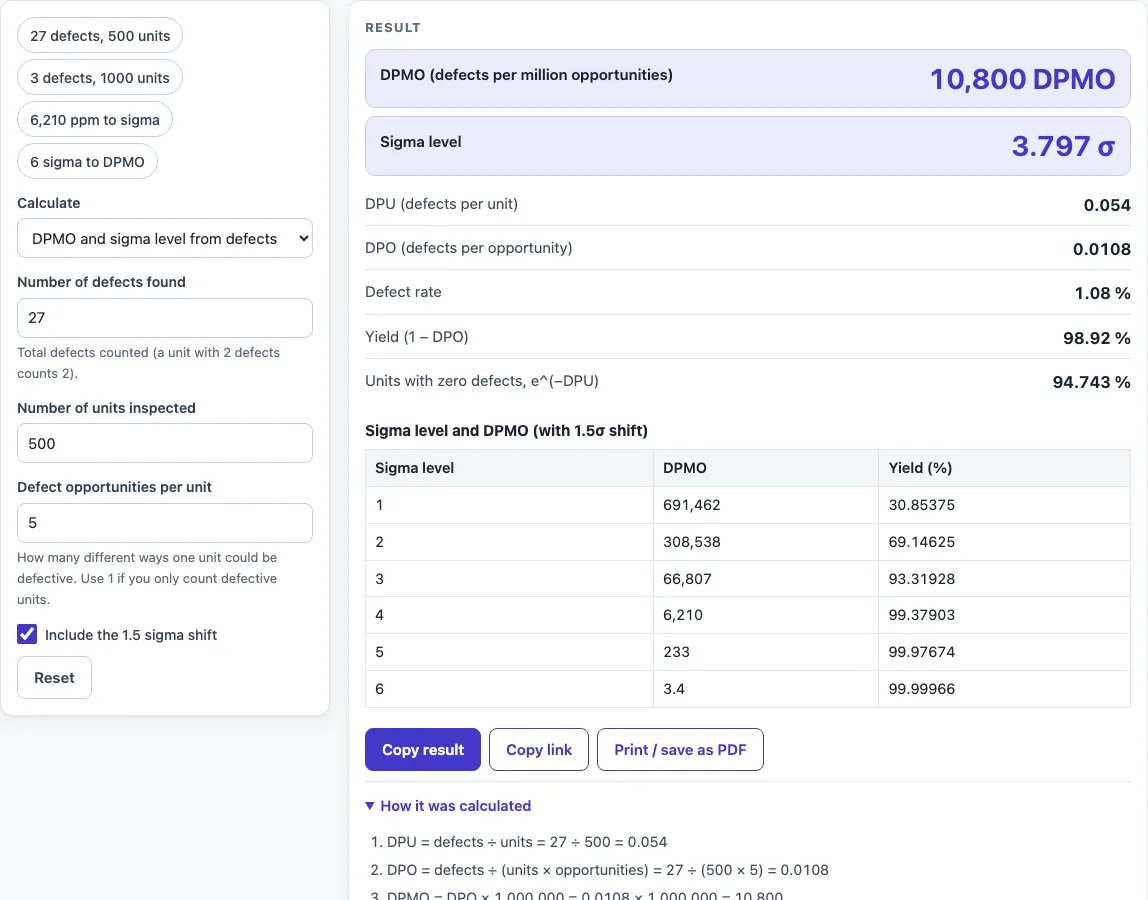
How to use the Six Sigma Calculator
- Under Calculate, use “DPMO and sigma level from defects” if you have counts, “DPMO from a sigma level” if you have a target sigma, or “Sigma level from DPMO / ppm” if you have a defect rate.
- In defects mode, enter the number of defects, the number of units and the opportunities per unit. In the other modes, enter the sigma level or the DPMO or ppm value (above 0 and below 1,000,000).
- Read the result. It updates as you type, so you can change one value and see the effect straight away.
- Check the figures under “How it was calculated”. It shows the formula, the values substituted and the answer with units.
- Tick or untick “Include the 1.5 sigma shift”. It is ticked by default. Unticking it gives the plain z-score.
- Use a preset button above the form to load a typical case, or press “Reset” to return to the starting example.
Once the result is right, press “Copy result” to copy the result lines with a link, or “Copy link” to copy the page address. The address stores every input, so the same calculation reopens later or can be sent to a colleague. “Print / save as PDF” prints a one-page record with the inputs, results, calculation steps and date.
What is the formula of six sigma?
The sigma level is Φ⁻¹(1 − DPO) + 1.5, where DPO is defects per opportunity and Φ⁻¹ is the inverse standard normal cumulative distribution function. Φ⁻¹ turns a defect proportion into a z-score, and adding 1.5 applies the shift convention.
The 1.5 sigma shift is a convention associated with Motorola. It converts long-term data into a short-term sigma level by assuming the process mean drifts by 1.5σ. Without the shift, the result is the plain z-score Φ⁻¹(1 − DPO). For example, the page default of 27 defects in 500 units with 5 opportunities each gives a sigma level of 3.797 with the shift and 2.297 without it.
What is the 6 sigma formula?
Six sigma is a sigma level of 6, and the reverse form of the formula gives its defect rate: DPMO = 1,000,000 × (1 − Φ(σ − 1.5)). Setting σ to 6 with the shift gives 3.398 DPMO, about 3.4, and a yield of 99.99966%.
With the shift switched off, the 1.5 is replaced by 0, so a sigma level of 6 gives 0.000987 DPMO. The sigma level table on the page follows the checkbox. Sigma levels above 8 trigger a warning, because the result is extremely sensitive to tiny changes in the defect rate.
What is the DPMO formula?
DPMO is defects per opportunity multiplied by 1,000,000, where defects per opportunity equals defects divided by (units × opportunities per unit). Written out, DPMO = defects ÷ (units × opportunities per unit) × 1,000,000.
For example, 3 defects in 1,000 units with 12 opportunities each gives DPO 0.00025, which is 250 DPMO and a yield of 99.975%. Yield is 1 − DPO. Defects per unit (DPU) is defects ÷ units, and it ignores opportunities, so it cannot be compared directly with DPMO. When each unit has only one opportunity, DPMO counts defective units only.
What does a sigma level table look like?
With the 1.5 sigma shift, the calculator’s table gives 691,462 DPMO at 1 sigma, 308,538 at 2, 66,807 at 3, 6,210 at 4, 233 at 5 and 3.4 at 6. Each step up in sigma level cuts defects sharply, which is why moving from 4 to 5 sigma takes far more improvement than moving from 2 to 3.
Worked examples
| Input | Result |
|---|---|
| 27 defects, 500 units, 5 opportunities each | 10,800 DPMO, 3.797 σ |
| 3 defects, 1000 units, 12 opportunities each | 250 DPMO, 4.981 σ |
| 6210 DPMO | 6,210 DPMO, 4 σ |
| sigma level 6 | 3.398 DPMO, 6 σ |
| 27 defects, 500 units, 5 opportunities each | 10,800 DPMO, 2.297 σ |
Calculated by the tool above with these values.
Frequently asked questions
Can I use the results in commercial projects or client reports?
Yes. You may use the results in commercial work, including reports, audits, client projects and training material, without attribution. Check the figures against your own process data before acting on them.
Is the calculator free, and is anything I type uploaded?
The calculator is free and has no account or sign-up. All calculations run in your browser, and nothing you type is uploaded.
Can I print or share a calculation?
Yes. “Print / save as PDF” produces a one-page record with the inputs, results, calculation steps and date. “Copy link” copies a page address that stores your inputs, so the calculation can be reopened later or sent to a colleague.
Why does the calculator show a warning?
Warnings flag results that need care. Zero defects leave the sigma level undefined, and the page gives a rule-of-three upper bound instead. Fewer than 5 defects make the estimate unstable, and a negative sigma level or a result with every opportunity defective is also flagged.
Is DPMO the same as ppm?
Only when each unit has one defect opportunity. DPMO counts defects per million opportunities, while ppm usually counts defective parts per million parts. The calculator treats the value you enter in the reverse mode as defects per million.
Should I use the 1.5 sigma shift?
Use it when you report short-term sigma levels in the usual six sigma convention, where 6 sigma means 3.4 DPMO. Untick it for the plain z-score of your long-term defect rate.
Where do the formulas come from?
- Pyzdek & Keller, The Six Sigma Handbook, and Montgomery, Introduction to Statistical Quality Control: DPU, DPO, DPMO, yield and RTY.
- The 1.5σ shift is the Motorola convention. The sigma table is computed from the normal distribution (3σ = 66,807 DPMO, 4σ = 6,210, 5σ = 233, 6σ = 3.4 with the shift).
Related tools
- Cpk Formula and Calculator: use it to check how well a process fits its specification limits.
- First Pass Yield Calculator: use it when you need yield across several process steps.
- Gage R&R Formula and Calculator: use it to check whether measurement error is hiding real process variation.
- Cycle Time Calculator: use it to measure how long one unit takes to pass through a process.
- Kanban Formula and Calculator: use it to size work-in-process limits in a pull system.
- EOQ Formula and Calculator: use it to find the order quantity that minimises inventory costs.
- Inventory Turnover Calculator: use it to measure how often stock is sold and replaced.
- All manufacturing and inventory calculators: use it to browse every tool on the site.