Safety Stock Formula and Calculator
Choose a method, enter your demand, lead time and service level, and get the safety stock and the reorder point.
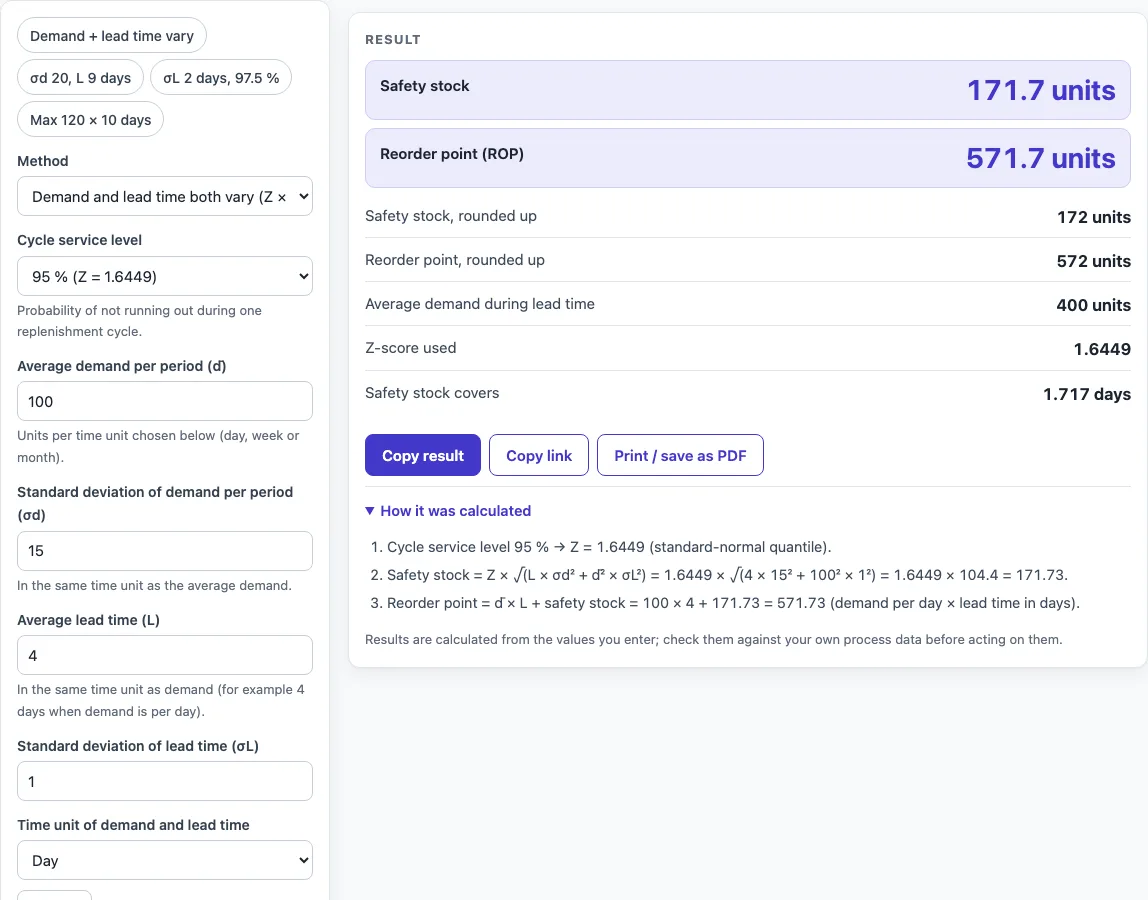
How to use the Safety Stock Calculator
- Under Method, choose combined (demand and lead time vary), demand variability only, lead-time variability only, or the basic max-minus-average formula.
- Choose a time unit (day, week or month). Enter every demand, standard deviation and lead-time value in that same unit.
- Enter average demand per period. For the demand method, also enter the standard deviation of demand (σd) and the average lead time (L).
- For the combined and lead-time methods, enter the standard deviation of lead time (σL). For the basic method, enter maximum demand per period and maximum lead time instead.
- Choose a service level from the service level select, or pick ‘Other level’ and type any percentage below 100.
- Read the results, which update as you type: safety stock, reorder point, average demand during lead time, the Z-score used, and how many periods of average demand the safety stock covers.
- Check any warnings, then open ‘How it was calculated’ to see the formula, the substituted values and the answer with units.
Preset buttons above the form load typical cases, such as ‘Max 120 × 10 days’. ‘Reset’ restores the starting example. ‘Copy link’ keeps every input in the page address, and ‘Print / save as PDF’ gives a dated record.
How do you calculate safety stock (the calculate safety stock formula)?
The combined formula is safety stock = Z × √(L·σd² + d̄²·σL²). Here d̄ is average demand per period, σd is the standard deviation of demand per period, L is average lead time, and σL is the standard deviation of lead time. It assumes demand and lead time are independent, and it is the standard statistical safety stock formula for independent demand and lead-time variability (see Chopra & Meindl). All inputs must use the same time unit.
Z is the standard-normal quantile of the cycle service level, which is the probability of not running out during one replenishment cycle. Common values are 1.2816 for 90 %, 1.6449 for 95 % and 2.3263 for 99 %. A higher service level gives a larger Z and therefore more safety stock.
The reorder point is average demand × lead time + safety stock.
For example, take d̄ 100 per day, σd 15, L 4 days, σL 1 day and a 95 % service level. The variance term is 4 × 15² + 100² × 1² = 10,900, its square root is 104.40, and 1.6449 × 104.40 = 171.73. The reorder point is 400 + 171.73 = 571.73.
What is the inventory safety stock formula for simpler cases?
When only demand varies, use safety stock = Z × σd × √L. When only lead time varies, use safety stock = Z × d̄ × σL. The basic method uses (maximum demand per period × maximum lead time) − (average demand × average lead time) and does not use a service level.
For the demand method with d̄ 100, σd 20, L 9 days and 95 %, the safety stock is 1.6449 × 20 × 3 = 98.69, and the reorder point is 900 + 98.69 = 998.69. For the basic method with maximum demand 120 per day and maximum lead time 10 days, against averages of 100 per day and 7 days, the result is (120 × 10) − (100 × 7) = 500.
Worked examples
| Input | Result |
|---|---|
| d̄ 100 per day, σd 15, L 4 days, σL 1, 95 % service | safety stock 171.7, reorder point 571.7 |
| d̄ 100 per day, σd 20, L 9 days, 95 % service | safety stock 98.69, reorder point 998.7 |
| d̄ 100 per day, L 7 days, σL 2, 97.5 % service | safety stock 392, reorder point 1,092 |
| max 120 per day × max 10 days, average 100 per day × 7 days | safety stock 500, reorder point 1,200 |
| d̄ 500 per week, σd 80, L 2 weeks, 99 % service | safety stock 263.2, reorder point 1,263 |
Calculated by the tool above with these values.
Frequently asked questions
How do I determine safety stock?
Choose the method that matches your variability: use the combined method when both demand and lead time vary, and a single-variable method when only one does. Enter your averages, standard deviations and service level in one time unit. The safety stock in the result is rounded up to whole units.
What service level should I choose?
Pick the level that matches how often you can accept running out during one replenishment cycle. Higher levels give more safety stock. The select offers 90 % to 99.9 %, and ‘Other level’ accepts any percentage below 100. The calculator warns you below 50 % and above 99.9 %.
What do the warnings mean?
Warnings flag inputs that may signal a data-entry mistake or an unusual process, such as a standard deviation larger than its average. The result is still calculated, so check those inputs before you rely on it.
Can I use the results in commercial projects or client reports?
Yes. Results may be used in commercial work, including reports, audits, client projects and training material, without attribution.
Is the calculator free, and is anything I type uploaded?
The calculator is free. Everything is calculated in your browser, nothing you type is uploaded, and there is no account or sign-up.
Can I print or share a calculation?
Yes. ‘Print / save as PDF’ produces a one-page record with the inputs, results, calculation steps and date. ‘Copy link’ copies the page address, which stores every input in the ?s= part of the URL, so the calculation reopens later or can be sent to a colleague. ‘Copy result’ copies the result lines with a link.
Where do the formulas come from?
- Silver, Pyke & Peterson, Inventory and Production Management in Supply Chains; Chopra & Meindl, Supply Chain Management; Nahmias, Production and Operations Analysis: the safety stock formulas.
- NIST/SEMATECH e-Handbook of Statistical Methods, normal distribution: the Z quantile of the service level, computed in the browser.
Related tools
- Inventory Turnover Calculator (Stock Turnover Ratio): use it to measure how quickly your stock sells through over a period.
- Cpk Formula and Calculator: use it to check how well a process stays within its specification limits.
- Cycle Time Calculator: use it to work out how long one unit takes to pass through a process.
- EOQ Formula and Calculator (Economic Order Quantity): use it to find the order size that balances ordering and holding costs.
- First Pass Yield Calculator: use it to find the share of units that pass a process without rework.
- Gage R&R Formula and Calculator: use it to judge whether your measurement system is reliable enough for decisions.
- Kanban Formula and Calculator: use it to size the number of kanban cards or containers in a pull system.
- All manufacturing and inventory calculators: use it to browse every calculator on the site.