Run Chart Maker
Paste your values in time order to draw a run chart with the median line and see any shift, trend or too-long run marked on the chart.
How to use the Run Chart Maker
- Paste or type your data into the input box. Use one point per line as “label, value”, for example “Jan, 42”, or just the values. Plain numbers or two pasted spreadsheet columns also work, up to 500 points. A first line without a number is read as column titles.
- Choose a rule set in the run chart rules select: “IHI rules: shift and trend” (the default) or “Anhøj rules: longest run and crossings”.
- If you need to, open More options. Change “Shift: points in a row on one side of the median” or “Trend: points in a row going up or down” to set your own rule lengths. Use “Baseline: use the first N points for the median” to calculate the median from an early period only; leave it blank to use all points.
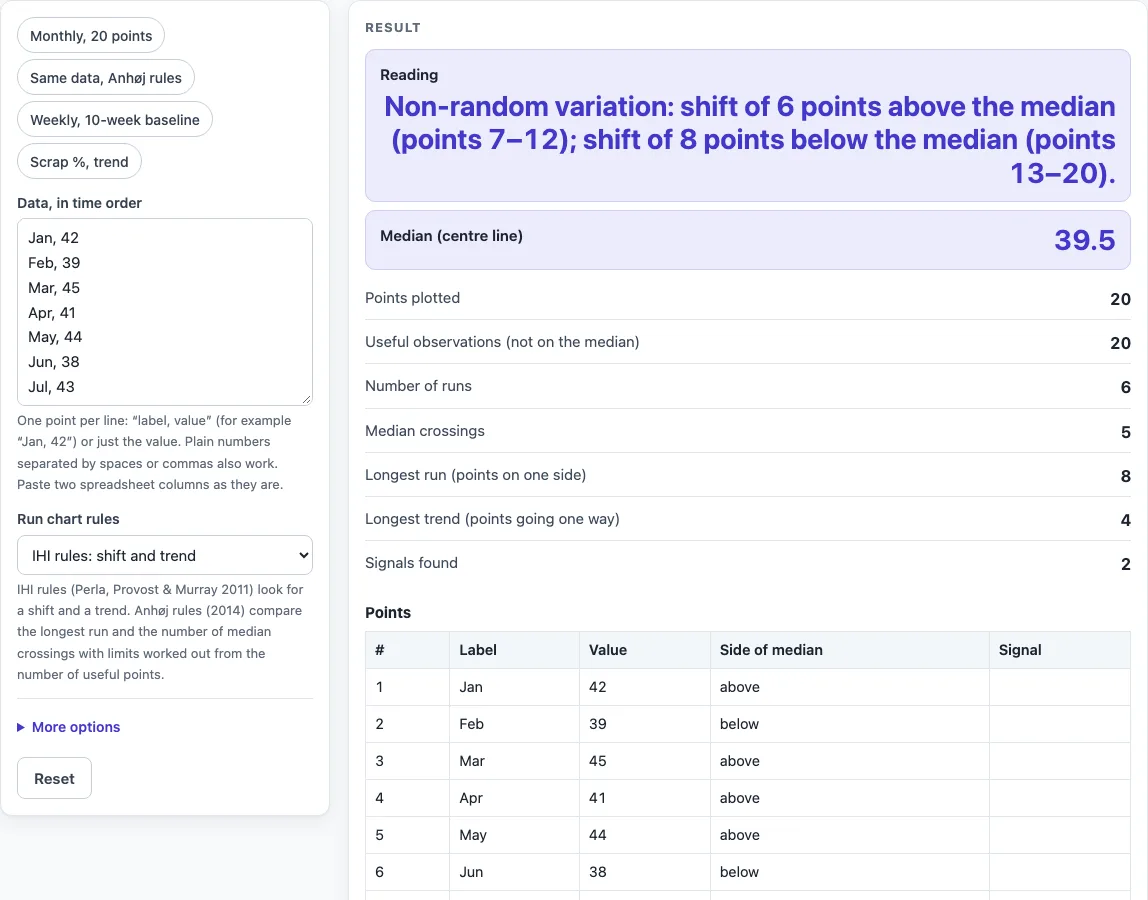
- Read the result. The Reading line lists the signals with point numbers; below it are the median, runs, crossings, longest run and trend, and the rule limits.
- Check the chart. The values are joined in time order, the median is green, any baseline period is shaded, and points that are part of a signal are red.
- Check the table, which lists every point with its side of the median and any signal.
Presets give a quick start: Monthly, 20 points; Same data, Anhøj rules; Weekly, 10-week baseline; and Scrap %, trend.
What is a run chart?
A run chart is a line graph that plots values in the order they happened, with the median drawn as a centre line. It shows how a measure moves over time and whether it stays on one side of its typical level or changes direction in a way that may not be chance. Unlike a control chart, a run chart has no control limits.
Points that fall exactly on the median are left out when runs are counted; the remaining points are called useful observations (the trend rule still uses every point). A run is one or more consecutive useful points on the same side of the median. The number of runs equals the number of median crossings plus one. The rules are designed for at least 10 useful observations, because with fewer points a missing signal tells you very little.
What are the run chart rules?
Run chart rules are checks for patterns that are unlikely to come from random variation alone. The two rule sets in this tool are IHI rules, which look for shifts and trends, and Anhøj rules, which look at the longest run and the number of median crossings.
Under IHI rules, a shift is 6 or more points in a row all above or all below the median. A trend is 5 or more points in a row all going up or all going down, where consecutive equal values count as one point. The IHI rule sheet, based on Provost and Murray’s The Health Care Data Guide, suggests 8 points for a shift and 6 for a trend when you have more than 20 points, and the tool warns you when you use shorter rules with more data.
Anhøj rules, from Anhøj and Olesen (PLoS ONE, 2014), use the number of useful observations, n. The longest run limit is log2(n) + 3, rounded to the nearest whole number. The minimum number of crossings is the lower 5th percentile of a binomial distribution with n − 1 trials and p = 0.5. A run longer than the limit, or fewer crossings than the minimum, is a signal. For n = 20, the limits are 7 for the longest run and 6 for crossings.
The two rule sets can disagree, so check which one you used. IHI mode does not include the number-of-runs table, so compare your count against that table in your guide or switch to Anhøj rules. An astronomical point, a value far outside the rest of the data, has no numeric rule, so look at the chart.
Sources
- IHI shift, trend, runs and astronomical-point rules: Run Chart Rules (Center for Care Innovations, adapted from Provost & Murray, The Health Care Data Guide, 2022); shift 6 and trend 5 as in Perla, Provost & Murray, BMJ Quality & Safety 2011;20:46–51
- Longest-run and crossings limits: Anhøj J, Olesen AV, Run Charts Revisited, PLoS ONE 2014;9(11):e113825 (Table 1 reproduced by the tool’s tests)
Results are calculated from the values you enter; check them against your own process data before acting on them.
Worked examples
| Input | Result |
|---|---|
| 20 points, IHI rules: shift and trend, median of the first 20 | 2 signal(s); median 39.5 |
| 20 points, Anhøj rules: longest run and crossings, median of the first 20 | 2 signal(s); median 39.5 |
| 18 points, IHI rules: shift and trend, median of the first 10 | 2 signal(s); median 60.5 |
| 18 points, IHI rules: shift and trend, median of the first 18 | 2 signal(s); median 3.15 |
| 18 points, Anhøj rules: longest run and crossings, median of the first 18 | No signal; median 3.15 |
Calculated by the tool above with these values.
Frequently asked questions
Is the run chart maker free, and is anything uploaded?
Yes, the tool is free and needs no sign-up. It runs in your browser, and nothing you type is uploaded.
Can I print or share a run chart?
Yes. Copy link keeps all your inputs in the URL, so anyone you send it to sees the same setup. Print / save as PDF gives a dated record with your inputs, results, and steps.
What is the difference between a run chart and a control chart?
A run chart shows the median as its centre line and has no control limits. A control chart adds limits around the data, so you can judge whether points fall outside the expected range. Start with a run chart when you want to check for patterns over time.
How is a run chart used in healthcare?
Health care teams use run charts to see whether a change in a process, such as waiting times or the number of patients seen per day, has shifted results over time. The IHI rules in this tool come from health care quality improvement work. A signal is a prompt to investigate, not proof that a change worked.
What is an example of a run chart?
The default data is 20 monthly values from Jan (42) to Aug (31). The median is 39.5 and there are 20 useful observations, 6 runs, and 5 crossings. Under IHI rules, points 7 to 12 form a shift above the median, and points 13 to 20 form a shift below it. Under Anhøj rules, the longest run of 8 is above the limit of 7, and 5 crossings is below the minimum of 6, so both tests flag a signal.
Why does the tool warn me about my number of points?
The tool warns when you have more than 20 points and use shorter rules, since the IHI rule sheet suggests longer ones for larger datasets. It also warns when you have fewer than 10 useful observations, because a missing signal then tells you little.
Related tools
- Control chart generator: use it when you need control limits around your data, not just a median line.
- Pareto chart maker: use it to rank causes or categories by how much they contribute to a problem.
- Histogram maker: use it to see how values are spread across ranges rather than how they change over time.
- Cpk calculator: use it to measure how well a process meets its specification limits.
- Six sigma calculator: use it to convert defect rates into sigma levels for process improvement work.
- Cycle time calculator: use it to work out how long a process takes from start to finish.
- All manufacturing and inventory calculators: use it to browse every calculator on the site in one place.