OEE Formula and Calculator
Enter planned production time, downtime, ideal cycle time and the total and good counts to get availability, performance, quality and OEE.
The OEE formula multiplies three ratios: Availability × Performance × Quality. This OEE calculator applies that formula to your production numbers and returns OEE as a percentage, along with each of the three factors. OEE stands for overall equipment effectiveness (often written overall equipment efficiency), so the overall equipment effectiveness formula and calculation are the same under either name. It runs in your browser, it is free, and you do not need to sign up.
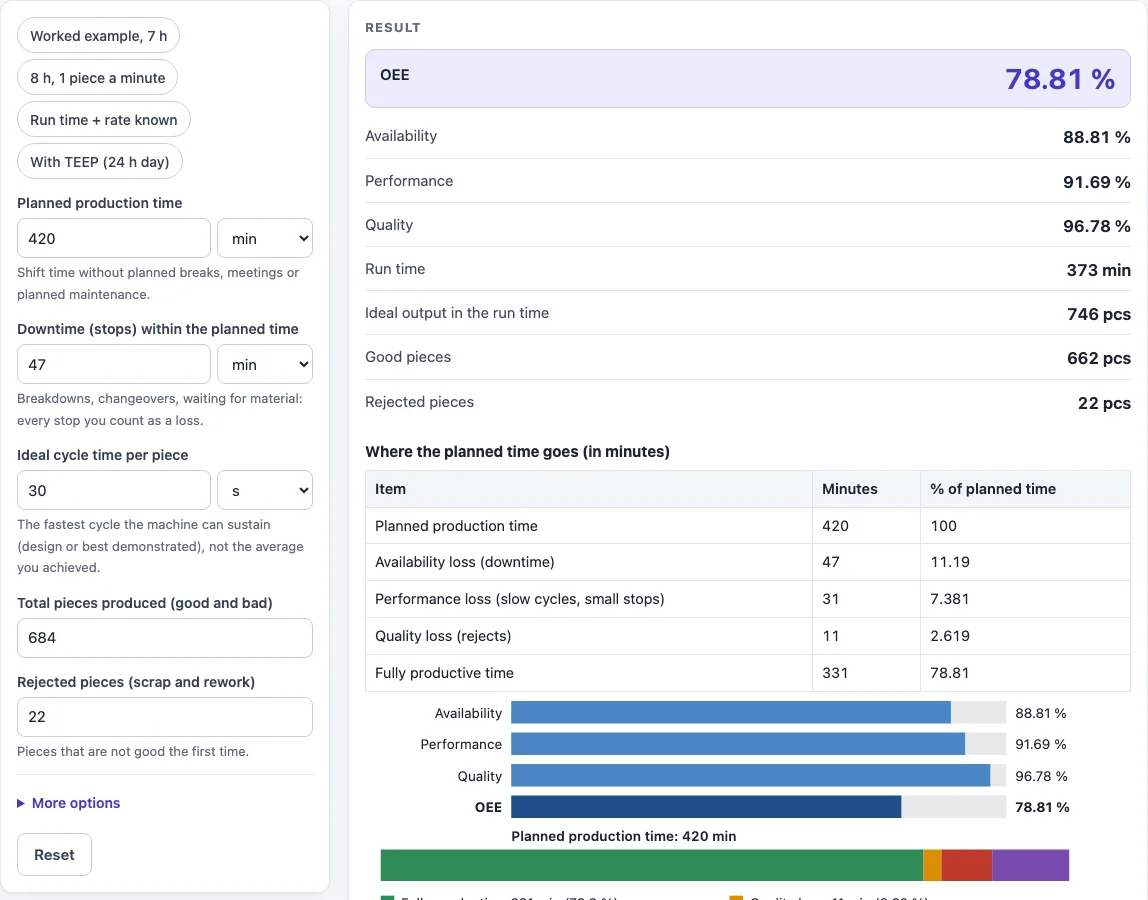
You enter planned production time, downtime, ideal cycle time, total pieces and rejects. The result updates as you type. The page also shows the run time, the ideal output, the good and rejected pieces, a loss table and a chart, so you can see where the planned time is lost.
How to use the OEE Calculator
- Enter the planned production time and choose its unit (min, h or s).
- Enter the downtime. If you prefer, open More options and choose “I know the run time” to enter the run time directly.
- Enter the ideal cycle time (seconds or minutes), or switch to an ideal run rate (pieces per second, minute or hour).
- Enter the total pieces produced.
- Enter the rejected pieces (the default), or switch the input to good pieces.
- Optional: enter the all (calendar) time to show utilization and TEEP.
- Read the result: OEE, availability, performance, quality, run time, ideal output, good pieces and rejected pieces. Then check the loss table and the chart.
Preset buttons above the form load typical cases, and Reset restores the starting example. Under the result, “How it was calculated” shows the formula, the values substituted and the answer with units. Copy result copies the result lines with a link, Copy link copies the page address that stores your inputs, and Print / save as PDF produces a one-page record.
The “Worked example, 7 h” preset reproduces the example below. Copy link keeps every input in the page address, and Print / save as PDF gives a dated record.
OEE meaning: what is OEE in manufacturing, and what is its formula?
The OEE formula is OEE = Availability × Performance × Quality. It is usually credited to Nakajima’s Introduction to TPM (1988). Each factor is normally a ratio between 0 % and 100 %, so OEE is the share of planned production time that turns into good pieces at the ideal speed.
Availability = run time ÷ planned production time, where run time = planned production time − downtime. Performance = (ideal cycle time × total pieces) ÷ run time. Quality = good pieces ÷ total pieces. The calculator also checks the result with good pieces × ideal cycle time ÷ planned production time, which gives the same answer when the inputs are consistent.
What is the OEE equation, and how is each part calculated?
Written in full, the OEE equation is:
OEE = (run time ÷ planned time) × ((ideal cycle time × total pieces) ÷ run time) × (good pieces ÷ total pieces)
Run time appears in the numerator and denominator of the first two factors and cancels out. That is why the shorter check formula gives the same answer.
Here is a calculation example using the page default. The planned time is 420 min and the downtime is 47 min, so the run time is 373 min and availability is 88.81 %. The ideal cycle time is 30 s, which is 0.5 min. With 684 pieces made, the ideal output in the run time is 373 ÷ 0.5 = 746 pieces, and performance is (0.5 × 684) ÷ 373 = 91.69 %. With 22 rejects, there are 662 good pieces, so quality is 662 ÷ 684 = 96.78 %. Multiplying the three gives OEE = 78.81 %.
The loss table shows the same result in minutes. Availability loss is 47 min (the downtime), performance loss is 31 min (373 − 342), quality loss is 11 min (22 × 0.5) and fully productive time is 331 min (662 × 0.5). Together they add up to the 420 min planned time.
Worked examples
| Input | Result |
|---|---|
| 420 min planned, 684 pieces | OEE = 78.81 % (A 88.8 %, P 91.7 %, Q 96.8 %) |
| 8 h planned, 380 pieces | OEE = 75.21 % (A 87.5 %, P 90.5 %, Q 95 %) |
| 8 h planned, 7000 pieces | OEE = 71.46 % (A 81.3 %, P 89.7 %, Q 98 %) |
| 16 h planned, 4000 pieces | OEE = 81.67 % (A 90.6 %, P 92 %, Q 98 %) |
Calculated by the tool above with these values.
Frequently asked questions
Is the calculator free, and is anything I type uploaded?
Yes, the calculator is free. Everything is calculated in your browser, and nothing you type is uploaded. There is no account or sign-up.
Can I use the results in commercial projects or client reports?
Yes. You can use the results in commercial work, including reports, audits, client projects and training material, without attribution. The page advises that you check the results against your own process data before acting on them.
Can I print or share a calculation?
Yes. Print / save as PDF produces a one-page record with the inputs, results, calculation steps and date. Copy link copies a page address that stores every input, so the same calculation reopens later or can be sent to a colleague.
Why is performance above 100%?
Performance above 100 % means the ideal cycle time you entered is slower than what the machine really achieved, or the piece count includes pieces made outside the run time. The page advises using the fastest sustained (design or nameplate) cycle time. The performance loss is then shown as a negative number.
What is TEEP, and when does it appear?
TEEP = OEE × utilization, where utilization = planned production time ÷ all time. TEEP only appears when you enter all (calendar) time, and that value must be at least the planned time.
Does the calculator tell me whether my OEE is good?
No. The calculator does not give benchmark values such as “world class”. It only calculates from the values you enter.
Where do the formulas come from?
- Nakajima, Introduction to TPM (Japan Institute of Plant Maintenance, 1988): OEE = availability × performance × quality.
- Hansen, Overall Equipment Effectiveness: A Powerful Production/Maintenance Tool (2001), and ISO 22400-2 (KPI definitions for manufacturing operations management).
Related tools
- Cycle Time Calculator: use it to work out the ideal cycle time you need for the performance input.
- First Pass Yield Calculator: use it when you want to focus on the share of pieces that pass without rework.
- Cpk Formula and Calculator: use it to check how well a process stays within its specification limits.
- Gage R&R Formula and Calculator: use it to check whether measurement error is hiding real variation in your data.
- All manufacturing and inventory calculators: use it to browse every tool on the site.