MTBF Calculator (Mean Time Between Failures)
Enter operating hours and failures, or a failure rate or FIT value, to get MTBF, MTTR, availability and the chance of running without failure.
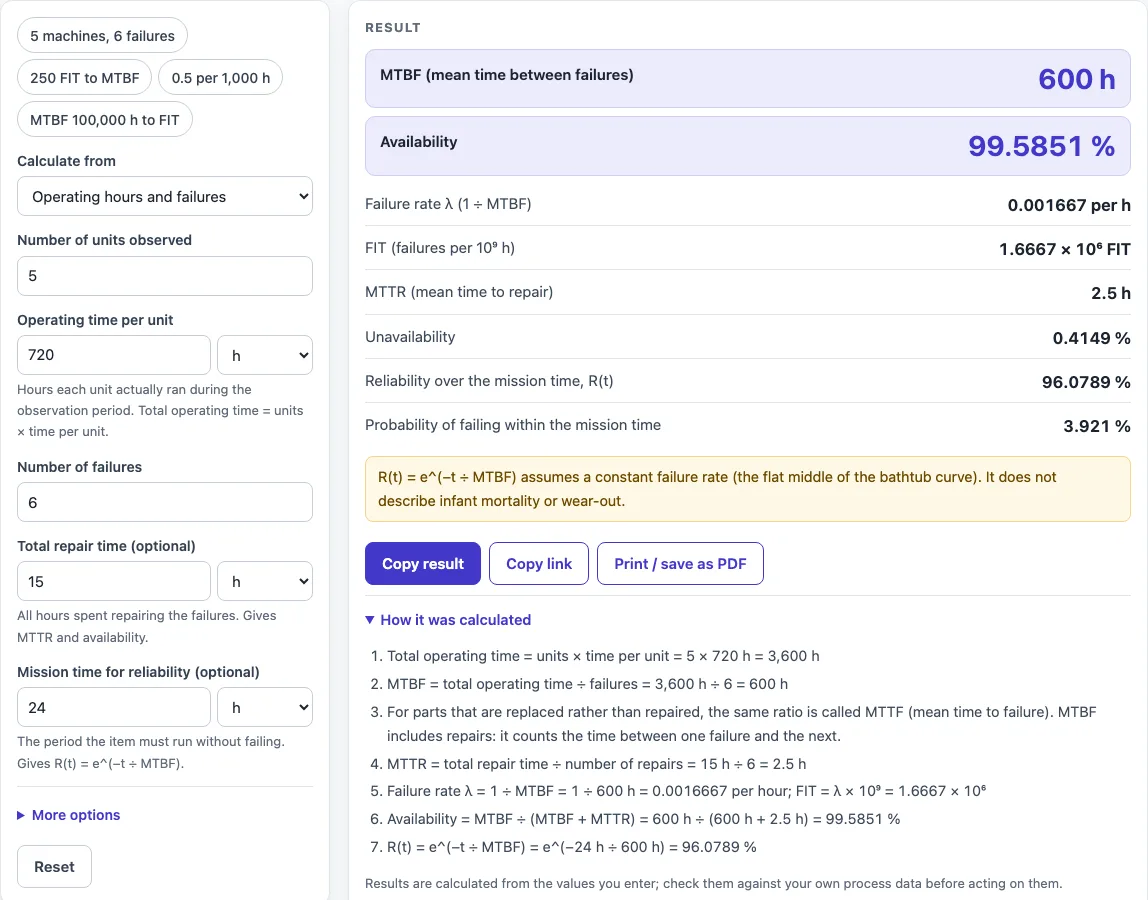
The MTBF calculator works out mean time between failures (MTBF) for a repairable item, either from operating hours and failure counts or from a known failure rate. The result updates as you type and appears in hours, and in years when it is at least 1,000 h. It also shows the failure rate λ, FIT, availability when repair time is known, and reliability over a mission time.
The calculator runs in your browser and is free. There is no sign-up, and nothing you type is uploaded. It suits quick checks in reliability work, maintenance planning, and training, whether you start from field failure counts or from a published failure rate.
How to use the MTBF Calculator
- Under Calculate from, choose one of the four modes: ‘Operating hours and failures’, ‘FIT (failures per 10⁹ hours)’, ‘Failure rate (λ)’ or ‘MTBF (to get λ and FIT)’.
- In operating mode, enter the number of units and the operating time per unit. The calculator multiplies them to get total operating time.
- Enter the number of failures as a whole number. Zero failures is rejected, because MTBF is then only known to be longer than the observed time.
- In the FIT or failure-rate modes, type the value and pick its unit: per hour, per 1,000 h, per 10⁶ h, FIT or per year (8,760 h).
- Enter time values in hours, days, minutes or seconds. They are converted to hours automatically.
- Optional: open ‘More options’ and enter total repair time and number of repairs to get MTTR. Leave the repairs box blank to use the number of failures. In the other modes you can type MTTR directly.
- Optional: enter a mission time to get reliability R(t) and the failure probability.
- Read the result, then check ‘How it was calculated’ underneath it.
Preset buttons above the form load typical cases, and ‘Reset’ restores the starting example. ‘Copy result’ copies the result lines with a link. ‘Copy link’ copies the page address, which holds every input, so the same calculation can be reopened later or sent to a colleague.
What do MTTR and MTBF mean?
MTBF (mean time between failures) is the average operating time between one failure of a repairable item and the next. MTTR (mean time to repair) is the average time needed to restore the item after a failure. Together they set availability: A = MTBF ÷ (MTBF + MTTR), and unavailability is 100 % − A.
What is the MTBF formula?
MTBF = total operating time ÷ number of failures. Total operating time is the number of units multiplied by the operating time per unit. For example, 5 machines running 720 h each give 3,600 h; with 6 failures, MTBF = 3,600 ÷ 6 = 600 h. The failure rate is the reciprocal: λ = 1 ÷ MTBF per hour.
What is the MTBF equation?
The MTBF equation is the same ratio written as MTBF = T ÷ r, where T is total operating time and r is the number of failures. The rate and FIT forms follow from it. FIT = λ × 10⁹, so MTBF in hours = 10⁹ ÷ FIT. For example, 1,000 FIT gives an MTBF of 1,000,000 h.
What is the mean time to failure formula?
The mean time to failure (MTTF) formula uses the same ratio: total operating time divided by number of failures. The difference lies in the item. MTTF applies to non-repairable parts that are replaced rather than repaired. MTBF counts the time between one failure and the next for a repairable item.
How is reliability calculated over a mission time?
Under the model, R(t) = e^(−t ÷ MTBF), and the failure probability is 1 − R(t). For a 24 h mission and an MTBF of 600 h, R = 96.08 %. This assumes a constant failure rate, which is the flat part of the bathtub curve with no infant mortality or wear-out. If the mission time is at least the MTBF, the calculator warns you. After one MTBF only about 36.8 % of items survive, and MTBF is not a service life.
Worked examples
| Input | Result |
|---|---|
| 5 units × 720 h, 6 failures | MTBF = 600 h, A = 99.585 % |
| 20 units × 8000 h, 4 failures | MTBF = 40,000 h, A = 99.978 % |
| 250 FIT | MTBF = 4 × 10⁶ h, A = 100 % |
| λ = 0.5 /1,000 h | MTBF = 2,000 h |
| MTBF 100000 h | MTBF = 100,000 h, A = 99.992 % |
Calculated by the tool above with these values.
Frequently asked questions
Can I use the results in commercial projects or client reports?
Yes. You can use the results in reports, audits, client projects and training material without attribution. Check the figures against your own process data before acting on them, as the page advises.
Is the calculator free, and is anything I type uploaded?
The calculator is free and needs no account. All calculations run in your browser, and nothing you type is uploaded.
Can I print or share a calculation?
Yes. ‘Print / save as PDF’ produces a one-page record with the inputs, results, calculation steps and date. ‘Copy link’ gives a link that reopens the same inputs.
Why does the calculator warn about fewer than 3 failures?
MTBF based on so few failures is very uncertain, so a small count can give a misleading figure. Collect more failure data where possible before relying on the result.
Why is zero failures rejected?
With zero failures, the calculation cannot give an MTBF. The calculator explains that the MTBF is only known to be longer than the observed operating time.
How do I convert FIT to MTBF?
Divide one billion by the FIT value: MTBF in hours = 10⁹ ÷ FIT. For example, 250 FIT is an MTBF of 4,000,000 hours.
Where do the formulas come from?
- IEC 60050-192 (International Electrotechnical Vocabulary, dependability) and MIL-HDBK-338B, Electronic Reliability Design Handbook: MTBF, MTTR, failure rate and availability.
- O’Connor & Kleyner, Practical Reliability Engineering. FIT = failures per 10⁹ device-hours (the usual industry definition).
Related tools
- Inventory Turnover Calculator : use it to measure how fast stock sells and is replaced.
- Cpk Formula and Calculator : use it to check how well a process meets its specification limits.
- Cycle Time Calculator : use it to find the time between finished units on a line.
- EOQ Formula and Calculator : use it to find the order quantity that balances ordering and holding costs.
- First Pass Yield Calculator : use it to measure the share of units that pass without rework.
- Gage R&R Formula and Calculator : use it to check whether a measurement system is precise enough.
- Kanban Formula and Calculator : use it to size the number of kanban cards in a pull system.
- All manufacturing and inventory calculators : use it to browse every tool on the site.