Lead Time Calculator
Add up the stages between placing an order and having the goods in stock to get the total lead time, expected delivery date and reorder point, or measure the average lead time from your past orders.
The Lead Time Calculator is a free tool that works out lead time, the elapsed time from placing an order to having the goods in hand. It has two modes. In stages mode you enter the time for order processing, waiting, production or supplier lead time, shipping, and receiving, and it adds them into a total in days and weeks, shows which stage takes the longest, and gives the expected delivery date from an order date. Dates mode takes the dates of your past orders (date ordered, date received) and shows the average, median, shortest and longest lead time and the standard deviation.
The calculator runs in your browser, so you can start right away. There is no account or sign-up. The result updates as you type, and each result comes with the formula and the values used, so you can check the working.
How to use the Lead Time Calculator
- Under Calculate, choose lead time from stages or lead time from order dates.
- To try a typical case first, click one of the preset buttons above the form, such as “5 stages, 16 days” or “4 past orders”.
- In stages mode, enter the time for each of the five stages. Each time can be in hours, days or weeks. Enter 0 for a stage you do not have.
- To get the expected delivery date, type the order date as yyyy-mm-dd and choose whether to count calendar days or working days (Monday to Friday).
- Open More options to add the value-added time (for process cycle efficiency), average demand per day (for the demand during the lead time) and safety stock (for the reorder point).
- In dates mode, type one order per line: the date ordered, a comma, then the date received, both as yyyy-mm-dd.
- Read the result. Open “How it was calculated” under it to see the formula, the substituted values and the answer.
- Check any warning message and correct the input if it applies. To start again, click “Reset”.
“Copy link” keeps every input in the page address, and “Print / save as PDF” gives a dated record.
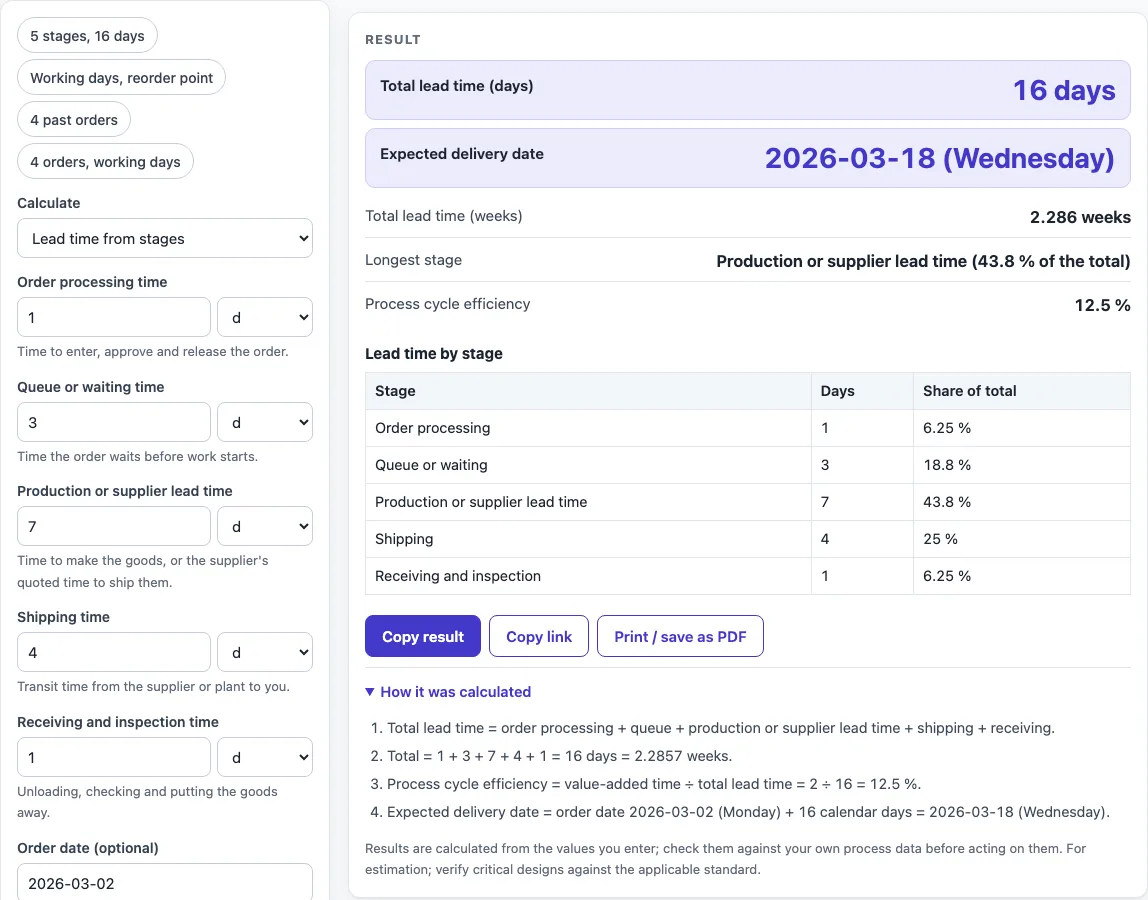
For example, the “5 stages, 16 days” preset adds 1, 3, 7, 4 and 1 days to get a 16-day lead time, so an order placed on Monday 2 March 2026 is expected on Wednesday 18 March.
How to calculate production lead time and total lead time
Total lead time is the sum of every stage between the order and the goods being usable: lead time = order processing + queue or wait + production (or the supplier’s lead time) + shipping + receiving and inspection. Use one unit for all stages, or let the calculator convert hours, days and weeks. In the default example, 1 + 3 + 7 + 4 + 1 = 16 days, which is 2.286 weeks, and production is the longest stage at 43.8 % of the total.
The same sum answers how to calculate process lead time inside a plant: list each wait and each processing step from release to finish and add them. Waiting time usually makes up most of it, which is why the longest stage is shown first.
How do you calculate lead time from past orders?
For each order, lead time = date received − date ordered. The average of those values is the lead time you can plan with, and the standard deviation shows how much it varies from order to order. For four orders that took 10, 14, 9 and 15 calendar days, the average is 12 days, the median is 12, the shortest is 9, the longest is 15, and the sample standard deviation is 2.944 days. Choose working days to count only Monday to Friday after the date ordered, up to and including the date received; the same four orders then take 8, 10, 7 and 11 working days. Public holidays are not excluded.
What is process cycle efficiency?
Process cycle efficiency = value-added time ÷ total lead time. It shows how much of the lead time is spent actually working on the product. With 2 days of value-added time in a 16-day lead time it is 12.5 %, which means the product waits or moves for the other 87.5 % of the time. Enter the value-added time under More options to see it.
Lead time and reorder point: how do they connect?
Demand during the lead time = average demand per day × lead time in days. The reorder point is that demand plus safety stock. With 40 units a day, a 27.17-day lead time and 150 units of safety stock, demand during the lead time is 1,087 units and the reorder point is 1,237 units. Place the next order when stock falls to that level.
Lead time vs cycle time: what is the difference?
Lead time is the full elapsed time from the order to delivery, including waiting. Cycle time is the time one unit takes at a station or through a process while it is being worked on, and takt time is the pace set by customer demand. Lead time is always at least as long as cycle time. If you know the work in process and the output rate, you can also find lead time with Little’s Law in the Cycle Time Calculator.
Worked examples
| Input | Result |
|---|---|
| five stage times | total lead time 16 days (2.286 weeks), expected delivery 2026-03-18 (Wednesday) |
| five stage times | total lead time 27.17 days (3.881 weeks), expected delivery 2026-04-09 (Thursday) |
| 4 past orders | average 12 days, shortest 9, longest 15 |
| 4 past orders | average 9 working days, shortest 7, longest 11 |
Calculated by the tool above with these values.
Frequently asked questions
Can I use the results in commercial projects or client reports?
Yes. You can use results in commercial work, including reports, audits, client projects and training material. You do not need to credit the tool.
Is the calculator free, and is anything I type uploaded?
The calculator is free and needs no account. All calculations run in your browser, and nothing you type is uploaded.
Can I print or share a calculation?
Yes. “Print / save as PDF” creates a one-page record with your inputs, results, calculation steps and the date. “Copy link” copies the page address, which stores your inputs, so the same calculation reopens later or can be sent to a colleague.
How do I calculate process lead time without a supplier or shipping stage?
Enter 0 for the stages you do not have. For a process inside one plant, use order processing for release time, queue for the waits between steps, and production for the processing time, then add the value-added time under More options to see how much of the total is real work.
How is the expected delivery date worked out?
The total lead time is rounded up to whole days and added to the order date. With calendar days, every day counts. With working days, only Monday to Friday count, starting with the first working day after the order date; holidays are not excluded. A warning appears when the lead time was rounded up or the order date falls on a weekend.
Why does the calculator show a warning?
Warnings flag inputs that may not give a useful answer: a lead time of more than a year, a safety stock entered without a demand, a delivery date that needed rounding up, a weekend order date in working-day mode, or a single past order, which has no standard deviation.
Are the results exact?
The results are calculated from the values you enter. Check them against your own process data before acting on them.
Where do the formulas come from?
- Lean Enterprise Institute, Lean Lexicon: lead time is the elapsed time from order to delivery.
- Rother & Shook, Learning to See: production lead time as the sum of waiting and processing times.
- George, Lean Six Sigma (2002): process cycle efficiency = value-added time ÷ lead time.
- Heizer & Render, Operations Management: reorder point = demand during lead time + safety stock.
Related tools
- Cycle Time Calculator: use it to find the time one unit takes, or lead time from work in process with Little’s Law.
- Safety Stock Calculator: use it to find the safety stock and reorder point for a given lead time and service level.
- EOQ Formula and Calculator: use it to find the order quantity that minimises ordering and holding costs.
- Takt Time Calculator: use it to find the pace needed to match customer demand.
- Inventory Turnover Calculator: use it to measure how often stock is sold or used over a period.
- Kanban Formula and Calculator: use it to size the number of kanban cards for a flow of parts.
- All manufacturing and inventory calculators: use it to browse every calculator on the site.