Kanban Formula and Calculator
Enter demand, waiting and processing time, a safety factor and the container quantity to get the number of kanban cards for the loop.
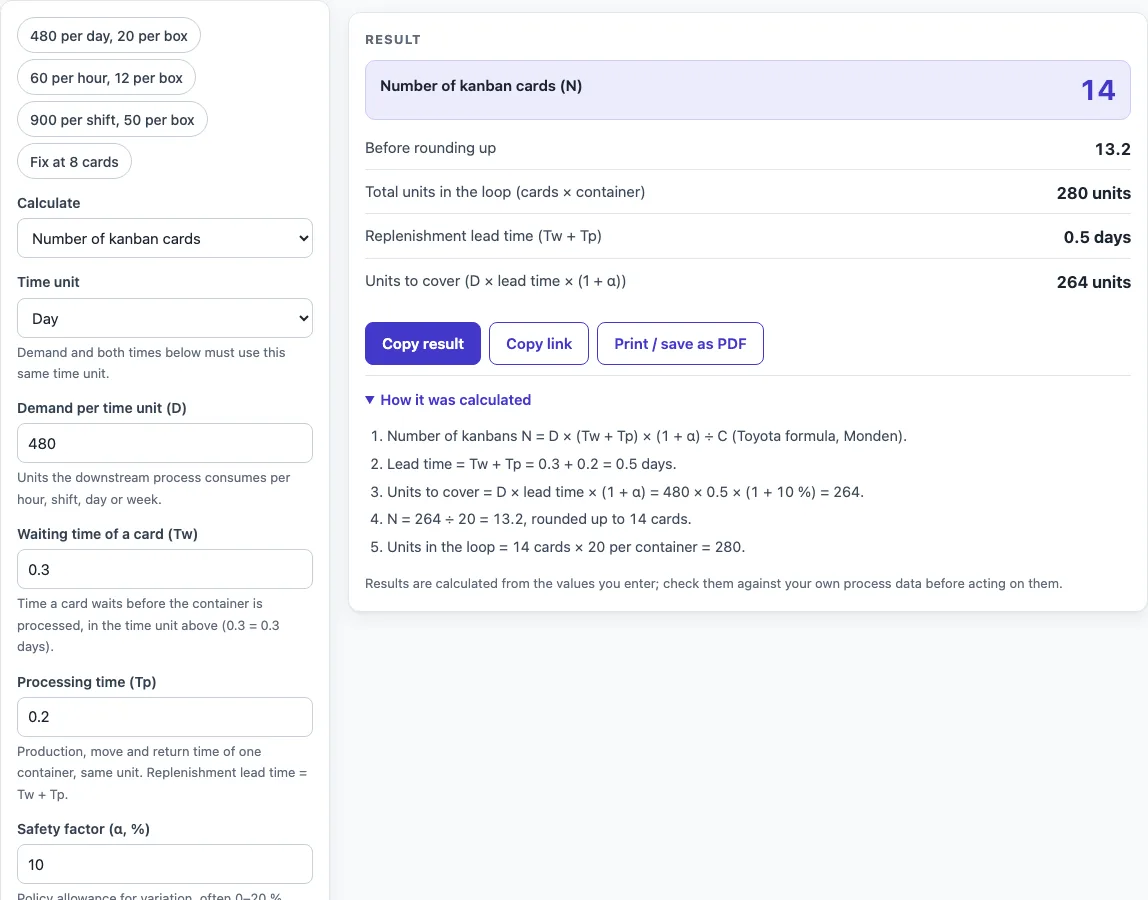
How to use the Kanban Calculator
- Load a preset above the form if your case is close to one of them: ‘480 per day, 20 per box’, ‘60 per hour, 12 per box’, ‘900 per shift, 50 per box’, or ‘Fix at 8 cards’. Otherwise, leave the starting example and change the values.
- Enter the demand (D) and choose its time unit: hour, shift, day or week.
- Enter the waiting time (Tw) and the processing time (Tp) in that same time unit. The lead time is Tw + Tp.
- Enter the safety factor (α) as a percentage. Type 10 for 10 %.
- Enter the container capacity (C) in units.
- Read the result. The number of cards is rounded up to a whole number, and the unrounded value is shown next to it.
- Open ‘How it was calculated’ under the result to see the formula, your values substituted into it, and the answer with units.
- To find the container size for a fixed number of cards, set Calculate to Container size for a given number of cards and enter a whole number of cards.
‘Reset’ restores the starting example. ‘Copy link’ copies the page address, which holds all your inputs, so the same calculation reopens later or can be sent to a colleague. ‘Copy result’ copies the result lines with a link. ‘Print / save as PDF’ produces a one-page record with the inputs, results, steps and date.
What is the kanban formula?
The kanban formula gives the number of kanban cards needed in a pull loop: N = D × (Tw + Tp) × (1 + α) ÷ C. Each card authorises one container of parts to move through the process, so the card count sets how much stock the loop can hold.
How is the number of kanban cards calculated?
First, add the waiting time and processing time to get the lead time. Second, multiply demand by the lead time and by (1 + α) to get the units to cover, which is the quantity the loop must hold. Third, divide by the container capacity and round up to a whole number of cards. With demand 480 per day, Tw 0.3 day, Tp 0.2 day, α 10 % and a container of 20, the lead time is 0.5 day, the units to cover are 480 × 0.5 × 1.1 = 264, and 264 ÷ 20 = 13.2. Rounded up, that gives 14 cards and 280 units in the loop.
Why must demand and times use the same time unit?
The formula multiplies demand by the lead time, so both must use the same unit. If demand is per day, Tw and Tp must be in days. If they are in hours, the result is wrong by a large factor. The unit you choose (hour, shift, day or week) does not change the answer, as long as all inputs match.
What does the safety factor do?
The safety factor α adds a margin of extra stock on top of the lead-time demand, to cover variation in demand or process times. Enter it as a percentage, where 10 means 10 %. The factor (1 + α) scales the units to cover upward, so a higher α means more cards. Values above 100 % trigger a warning, because they add more stock than the lead-time demand itself.
How does reverse mode find the container size?
Reverse mode starts from a fixed number of cards N and solves the formula for the container size: C = D × (Tw + Tp) × (1 + α) ÷ N. The result is rounded up to a whole unit, and the unrounded value is shown too. Using the same demand and times as before with 8 cards, the units to cover are 264, so each container needs 264 ÷ 8 = 33 units.
Worked examples
| Input | Result |
|---|---|
| D 480, lead time 0.5 days, α 10 %, 20 units per container | 14 kanban cards (280 units in the loop) |
| D 60, lead time 2 hours, α 20 %, 12 units per container | 12 kanban cards (144 units in the loop) |
| D 900, lead time 0.4 shifts, α 10 %, 50 units per container | 8 kanban cards (400 units in the loop) |
| D 480, lead time 0.5 days, α 10 %, 8 cards | containers of 33 units |
Calculated by the tool above with these values.
Frequently asked questions
Can I use the results in commercial projects or client reports?
Yes. You may use the results in commercial work, including reports, audits, client projects and training material, without giving attribution. Check the figures against your own process data before you rely on them.
Is the calculator free, and is anything I type uploaded?
The calculator is free, and there is no account or sign-up. Everything is calculated in your browser, so nothing you type is uploaded.
Can I print or share a calculation?
Yes. ‘Print / save as PDF’ prints a one-page record with your inputs, results, calculation steps and the date. ‘Copy link’ copies a page address that stores all your inputs, so you can reopen the calculation later or send it to a colleague.
Why is the number of cards rounded up?
A loop cannot use part of a card, and rounding down would leave the units to cover without enough containers. The unrounded value is shown so you can see how close the result is to the next whole number. If rounding up adds more than 20 % extra stock, the calculator shows a warning.
What do the warnings and errors mean?
Warnings flag inputs that are unusual but still calculate: a safety factor above 100 %, only one card, rounding that adds more than 20 % extra stock, or a container larger than the units to cover. Errors appear when the calculation cannot run, such as non-numeric or non-positive demand or container size, negative times or safety factor, a waiting plus processing time of zero, or a non-integer card count in reverse mode.
Where do the formulas come from?
- Monden, Toyota Production System: An Integrated Approach to Just-in-Time: N = D × (Tw + Tp) × (1 + α) ÷ C.
- Heizer & Render, Operations Management. The safety factor α is a policy choice; Toyota practice keeps it small (no more than about 10 %).
Related tools
- Inventory Turnover Calculator (Stock Turnover Ratio): use it to see how often your stock is sold and replaced over a period.
- Cpk Formula and Calculator: use it to check how well a process stays within its specification limits.
- Cycle Time Calculator: use it to work out the time each unit takes through a process step.
- EOQ Formula and Calculator (Economic Order Quantity): use it to find the order size that balances ordering and holding costs.
- First Pass Yield Calculator: use it to measure the share of units that pass a process without rework.
- Gage R&R Formula and Calculator: use it to check how much of your measurement variation comes from the measuring system.
- MTBF Calculator (Mean Time Between Failures): use it to estimate average operating time between failures of equipment.
- All manufacturing and inventory calculators: use it to browse every calculator on the site.