Histogram Maker
Paste your numbers to make a histogram with a frequency table, summary statistics, optional spec limits and a normal curve.
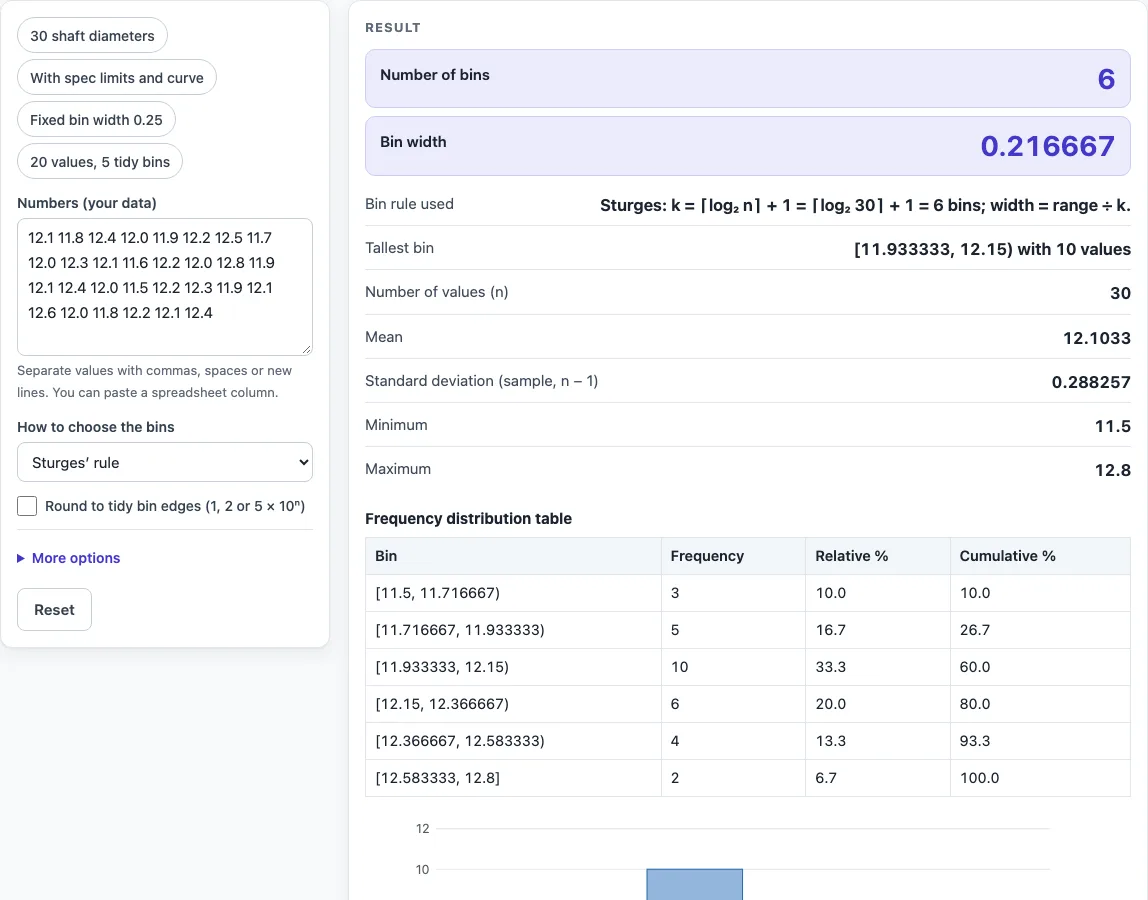
How to use the histogram maker
- Paste your numbers into the data box. Separate them with commas, spaces or new lines.
- Choose how the bins are set: Sturges’ rule, the square-root rule, Scott’s rule, the Freedman–Diaconis rule, a number of bins you type, or a bin width and start you type.
- Read the histogram. The bins are equal in width, and each bar shows how many values fall in it.
- Check the frequency table, which lists each bin range, frequency, relative % and cumulative %.
- Check the summary: n, mean, sample standard deviation, minimum, maximum, number of bins and bin width.
- Optional: turn on “Round to tidy bin edges” to make the width 1, 2 or 5 × 10ⁿ, starting at a multiple of that width.
- Optional, under More options: enter LSL and USL to draw the spec lines and count the values outside them.
- Optional, under More options: tick Show normal curve, which is scaled to counts.
- Read any warning, then open “How it was calculated” under the result to see the formula, the values substituted and the answer with units.
“Reset” restores the starting example, and the preset buttons above the form load typical cases. “Copy result” copies the result lines with a link, “Copy link” copies the page address that stores every input, and “Print / save as PDF” prints a one-page record with the inputs, results, calculation steps and date.
How does a histogram maker choose the number of bins?
The tool sets the bin count with one of four rules, or uses the count or width you type. Each rule gives a bin count or a bin width, and the tool then divides the range (maximum minus minimum) into equal parts.
Sturges’ rule sets k = ⌈log₂ n⌉ + 1, and the square-root rule sets k = ⌈√n⌉. With either, the bin width is range ÷ k. Scott’s rule uses h = 3.49 × s ÷ n^(1/3), and the Freedman–Diaconis rule uses h = 2 × IQR ÷ n^(1/3). With either of these, the number of bins is ⌈range ÷ h⌉. The IQR, the interquartile range, uses linear interpolation between sorted values, the default in R and NumPy.
For the numbers 1 to 100, Sturges gives 8 bins of width 12.375, and the square-root rule gives 10 bins. Scott gives a width of 21.81 and 5 bins, and Freedman–Diaconis gives a width of 21.33 and 5 bins. With tidy bin edges on, Sturges becomes 5 bins of width 20 starting at 0, with counts 19, 20, 20, 20 and 21.
If you type the number of bins yourself, the width is (max − min) ÷ classes. This is the class width formula taught in many statistics courses. For 20 values and 4 bins, the calculator gives 4 bins of width 5. For 30 values, Sturges gives 6 bins of width 0.21667, and Freedman–Diaconis gives 7 bins of width 0.1931. A width of 0.25 with a chosen start gives 6 bins.
Which bin does each value fall into?
Each bin includes its lower edge and excludes its upper edge, so a bin is written [a, b). The last bin includes both edges, so the maximum value is counted. Relative % is the count ÷ n, and cumulative % adds the relative percentages bin by bin until it reaches 100% at the last bin. When LSL and USL are entered, the values outside them are counted as well.
Sources
- Bin rules: Sturges (1926), Scott (1979), Freedman and Diaconis (1981), as summarised in Wikipedia, Histogram; square-root rule from the same page
- Histogram and relative frequency: NIST/SEMATECH e-Handbook, histogram
- IQR by linear interpolation (Hyndman and Fan type 7, the NumPy default)
Worked examples
| Input | Result |
|---|---|
| 30 values, Sturges’ rule | 6 bins of width 0.21667 |
| 30 values, Freedman–Diaconis rule (bin width) | 7 bins of width 0.1931 |
| 30 values, I choose the bin width and start | 6 bins of width 0.25 |
| 20 values, I choose the number of bins | 4 bins of width 5 |
| 30 values, Square-root rule | 6 bins of width 0.21667 |
Calculated by the tool above with these values.
Frequently asked questions
Can I use the results in commercial projects or client reports?
Yes. Results may be used in commercial work, including reports, audits, client projects and training material, without attribution. Results are calculated from the values you enter, so check them against your own process data before acting on them.
Is the calculator free, and is anything I type uploaded?
Yes, the calculator is free. Everything is calculated in your browser, nothing you type is uploaded, and there is no account or sign-up.
Can I print or share a calculation?
Yes. “Print / save as PDF” produces a one-page record with the inputs, results, calculation steps and date. “Copy link” copies a page address that stores every input in the ?s= part of the URL, so the same histogram reopens later or can be sent to a colleague.
Why does the tool show a warning?
Warnings appear for fewer than 30 values, more bins than values, a zero IQR, and values outside the spec limits. A zero IQR makes the Freedman–Diaconis width zero, so that rule cannot be used for that data.
Does the histogram maker create bins of unequal width?
No. The tool uses equal-width bins only, and it does not offer a density axis or an SVG download.
Related tools
- Run chart maker — use it to plot the same values in time order against their median and check for shifts and trends.
- Cpk calculator — use it to judge how well a process fits between its spec limits.
- Pareto chart maker — use it to rank categories by count when your data are labels rather than numbers.
- Control chart generator — use it to track a process over time, in the order the values were measured.
- All manufacturing and inventory calculators — use it to browse the rest of the calculator set.