Gage R&R Formula and Calculator
Paste your gage study measurements (part, operator, trials) to get EV, AV, GRR, %GRR of total variation and tolerance, and ndc.
How to use the Gage R&R Calculator
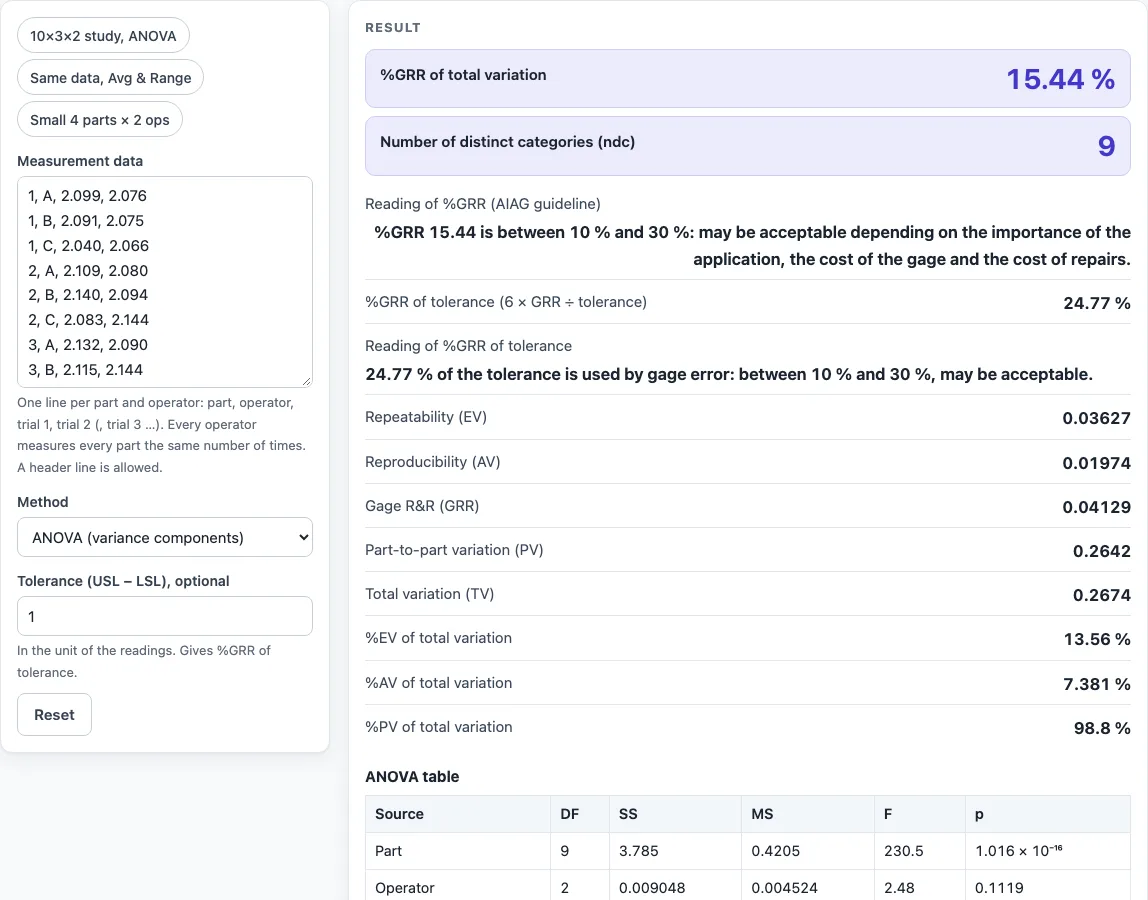
- Start with a preset above the form, such as “10×3×2 study, ANOVA”, or paste your own readings into the text box.
- Enter one line per part and operator, in the order part, operator, trial 1, trial 2 (add trial 3 if you have one). Separate the values with commas, semicolons or tabs. A header line is skipped.
- If you have one reading per line, use part, operator, value. Lines for the same part and operator add their trials together.
- Choose the method: ANOVA, or Average and Range. Average and Range needs 2 to 10 parts, 2 or 3 operators and 2 or 3 trials; otherwise choose ANOVA.
- Optionally, type the tolerance (USL − LSL) to see %GRR of tolerance.
- Read the result and its verdict. Each figure updates as you type.
- Open “How it was calculated” under the result to check each formula with your numbers, and review the ANOVA or variation tables.
Under “More options” you will find the less common inputs. “Reset” restores the starting example. “Copy result” copies the result lines with a link. “Copy link” copies a page address that stores all your inputs, so you can reopen the calculation later or send it to a colleague. “Print / save as PDF” produces a one-page record with the inputs, results, steps and date.
What is the gage R&R formula?
The gage R&R formula adds the repeatability variation (EV) and the reproducibility variation (AV) in quadrature: GRR = √(EV² + AV²). These are standard deviations, so they are squared, added and then square-rooted. The gage r and r formula is the same expression, and %GRR = GRR ÷ TV × 100, where TV is the total variation, TV = √(GRR² + PV²).
How does the Average and Range method calculate Gage R&R?
This method follows the AIAG MSA (4th edition) constants. EV = R̿ × K1, where R̿ is the average range and K1 depends on the number of trials. AV = √[(X̄diff × K2)² − EV² ÷ (n·r)], set to 0 if the value is negative, where K2 depends on the number of operators. PV = Rp × K3, where K3 depends on the number of parts.
How does the ANOVA method calculate Gage R&R?
ANOVA splits the variation into parts, operators, their interaction and repeatability. The part × operator interaction is tested with an F-test. If its p-value is above 0.25, the interaction is pooled into repeatability. Each variance component is then found from the mean squares. Repeatability equals MSE. Operator variance equals (MSO − MSPO) ÷ (parts × r). Part variance equals (MSP − MSPO) ÷ (operators × r). Any negative component is set to 0 and flagged with a warning.
What do %GRR and ndc tell you?
%GRR shows the gage’s share of total variation. Below 10 % is acceptable. From 10 % to 30 % may be acceptable, depending on the application, the cost of the gage and the cost of repairs. Above 30 % is not acceptable. ndc, the number of distinct categories, equals 1.41 × PV ÷ GRR, truncated to a whole number. An ndc below 5 triggers a warning.
Worked examples
| Input | Result |
|---|---|
| 10 parts × 3 operators × 2 trials, ANOVA (variance components) | %GRR 15.44 %, ndc 9 |
| 10 parts × 3 operators × 2 trials, Average and Range (AIAG constants) | %GRR 16.63 %, ndc 8 |
| 10 parts × 3 operators × 2 trials, ANOVA (variance components) | %GRR 15.44 %, ndc 9 |
| 4 parts × 2 operators × 2 trials, ANOVA (variance components) | %GRR 7.62 %, ndc 18 |
| 3 parts × 2 operators × 3 trials, Average and Range (AIAG constants) | %GRR 5.037 %, ndc 27 |
Calculated by the tool above with these values.
Frequently asked questions
Can I use the results in commercial projects or client reports?
Yes. You may use the results in reports, audits, client projects and training material without attribution. Check the results against your own process data before you act on them.
Is the calculator free, and is anything I type uploaded?
The calculator is free and requires no account or sign-up. All calculations run in your browser, and nothing you type is uploaded.
Can I print or share a calculation?
Yes. “Print / save as PDF” creates a one-page record with the inputs, results, calculation steps and date. “Copy link” copies an address that stores all your inputs, so anyone who opens it sees the same calculation.
What %GRR is acceptable?
Under the AIAG guideline, a %GRR below 10 % is acceptable, 10 % to 30 % may be acceptable depending on the application, and above 30 % is not acceptable. The same bands apply to %GRR of tolerance.
How many parts, operators and trials should a study use?
A common layout is 10 parts, 3 operators and 2 or 3 trials, which is the starting example here. The average and range method accepts up to 10 parts, 3 operators and 3 trials; ANOVA handles larger studies.
What does ndc mean?
ndc is the number of distinct categories the gage can tell apart within the part variation: 1.41 × PV ÷ GRR, truncated. Values below 5 trigger a warning.
Where do the formulas come from?
- AIAG, Measurement Systems Analysis (MSA) Reference Manual, 4th ed.: Average and Range and ANOVA methods, K1 (0.8862 for 2 trials, 0.5908 for 3), K2 (0.7071 for 2 operators, 0.5231 for 3), K3 for 2 to 10 parts, ndc = 1.41 × PV ÷ GRR, and the 10 % and 30 % %GRR bands.
- Study variation uses a 6σ spread as in the 4th edition and in Minitab’s Gage R&R documentation; the 3rd edition used 5.15σ.
Related tools
- Cpk Formula and Calculator: check whether a process meets its specification limits once measurement error is under control.
- First Pass Yield Calculator: measure how many units pass a process step without rework.
- Six Sigma Calculator: turn defect counts into DPMO and a sigma level once the gage is trusted.
- OEE Formula and Calculator: see how quality losses from rejects reduce overall equipment effectiveness.
- MTBF Calculator: track how often the gauge or machine fails between repairs.
- Takt Time Calculator: check that inspection fits inside the line’s takt time.
- All manufacturing and inventory calculators: browse every calculator on the site.