FMEA Template and RPN Calculator
Enter each failure mode with its severity, occurrence and detection to get the RPN, rank the risks and download the worksheet.
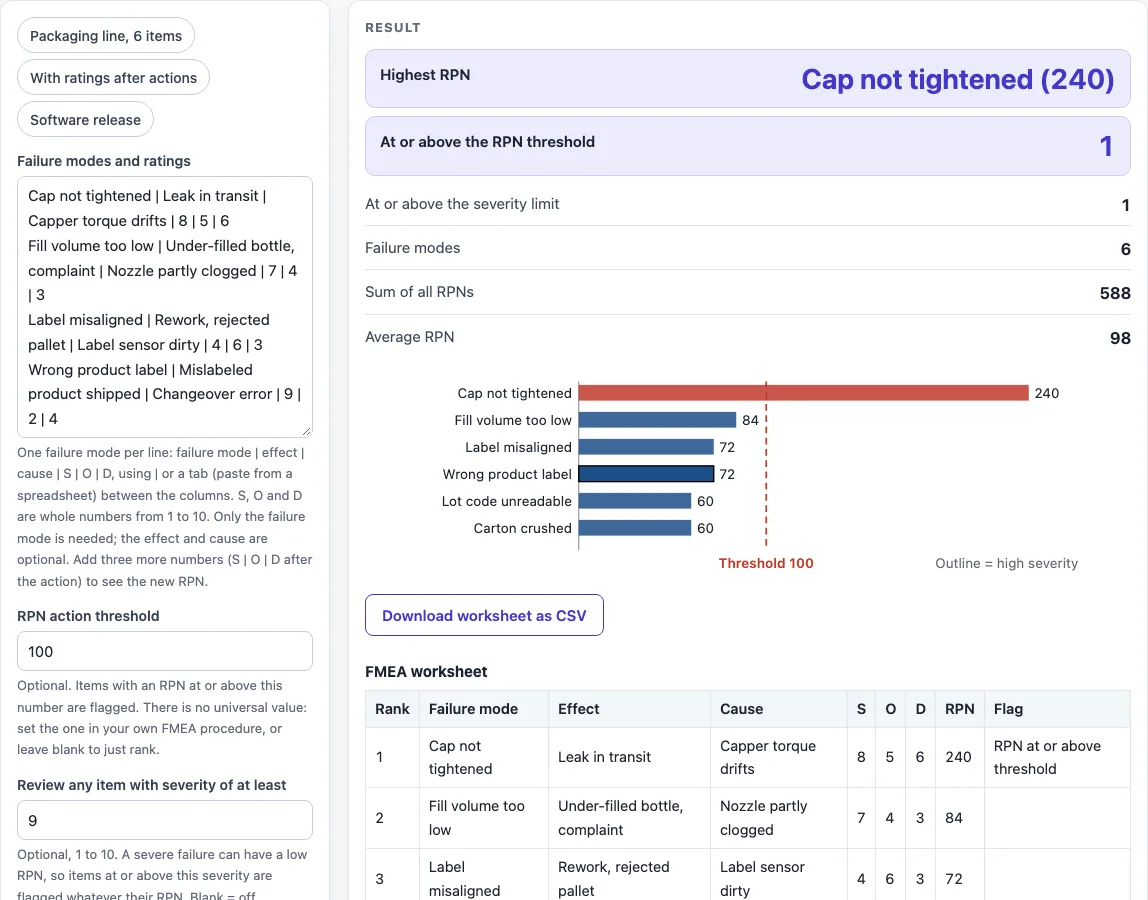
The FMEA Template and RPN Calculator is a free, fillable FMEA worksheet that works out the risk priority number (RPN) for every failure mode you list. You type or paste one failure mode per line with its effect, cause and the three ratings: severity (S), occurrence (O) and detection (D). The tool multiplies them into the RPN, ranks the failure modes from highest to lowest, flags the ones above your action threshold or with a high severity, draws a bar chart and lets you download the worksheet as a CSV file for Excel. If you also enter the ratings after your corrective action, it shows the new RPNs and how much the total risk fell.
The tool runs in your browser, so you can start right away. There is no account or sign-up, and nothing you type is uploaded. RPN here means risk priority number, not reverse Polish notation.
How to use the FMEA template
- Write one failure mode per line in Failure modes and ratings, in the form: failure mode | effect | cause | S | O | D. Use the | sign or a tab between columns, so you can paste straight from a spreadsheet.
- To start from an example, click one of the preset buttons above the form, such as “Packaging line, 6 items” or “With ratings after actions”.
- Rate each failure mode with whole numbers from 1 to 10 for severity, occurrence and detection, using the scales in your own FMEA procedure. A 1 is the best case and a 10 is the worst.
- Enter an RPN action threshold if your procedure has one. Items at or above it are flagged. Leave it blank to rank only.
- Enter a severity limit (for example 9) to flag severe failure modes whatever their RPN.
- To track corrective actions, add three more numbers at the end of the line: S | O | D after the action.
- Read the result, check any warning and look at the bar chart. Open “How it was calculated” for the ranked worksheet.
- Click Download worksheet as CSV to open it in Excel or Google Sheets.
“Copy link” keeps your worksheet in the page address, and “Print / save as PDF” gives a dated record.
For example, in the packaging preset “Cap not tightened” is rated S 8, O 5, D 6, so its RPN is 8 × 5 × 6 = 240 and it ranks first.
FMEA meaning: what does FMEA stand for?
FMEA stands for failure mode and effects analysis. It is a step-by-step method for finding the ways a product, process or service could fail (the failure modes), what each failure would cause (the effects) and why it could happen (the causes). It was developed by reliability engineers in the late 1950s to study problems that could arise from malfunctions of military systems, and it is now used in manufacturing, quality and safety work. An FMEA is made by a team, one line per failure mode, in a worksheet.
How is the RPN calculated?
The risk priority number is severity × occurrence × detection. Severity rates how serious the effect of the failure is, occurrence rates how likely the cause is to happen, and detection rates how likely it is that the failure will not be caught before it reaches the customer. Each is rated from 1 to 10, so the RPN is between 1 and 1,000. In the example, “Fill volume too low” is 7 × 4 × 3 = 84.
How do I use the RPN to decide what to fix?
Sort the failure modes from the highest RPN down and work on the top ones first: reduce the severity by changing the design, reduce the occurrence by removing the cause, or improve the detection with a better check. After the action, rate the failure mode again and compare. There is no universal RPN limit; use the threshold in your own procedure. Do not rely on the number alone. In the preset, “Label misaligned” (4 × 6 × 3) and “Wrong product label” (9 × 2 × 4) both have an RPN of 72, but the second has a severity of 9. The severity limit flags that item even though it is below the threshold.
RPN or Action Priority: which method should I use?
The RPN is the classic method. The AIAG & VDA FMEA handbook of 2019 replaced the RPN and the risk matrix with Action Priority (AP), which states how urgently improvement is needed. This tool calculates the RPN only. If a customer or standard requires Action Priority, use the handbook tables for that rating, and use this worksheet to organise the failure modes.
FMEA template columns
A basic worksheet has these columns: the item or process step, the potential failure mode, the potential effect, the potential cause, severity, occurrence, detection, RPN, the recommended action and the ratings after the action. This tool keeps the failure mode, effect and cause as text, calculates the RPN and ranks the lines. The responsible person, due date and action text are best kept in your own copy of the CSV.
Worked examples
| Input | Result |
|---|---|
| 6 failure modes | highest RPN: Cap not tightened (240) |
| 4 failure modes | highest RPN: Cap not tightened (240) |
| 4 failure modes | highest RPN: Email not sent (144) |
Calculated by the tool above with these values.
Frequently asked questions
Can I use the worksheet in commercial projects or client reports?
Yes. You can use results in commercial work, including reports, audits, client projects and training material. You do not need to credit the tool.
Is the FMEA template free, and is my data uploaded?
The tool is free and needs no account. All calculations run in your browser, and nothing you type is uploaded.
How do I get the template into Excel?
Click “Download worksheet as CSV”. The file opens in Excel, Google Sheets and LibreOffice with one row per failure mode and the RPN already calculated. You can also paste rows copied from a spreadsheet straight into the text box.
What are the severity, occurrence and detection scales?
Each rating is a whole number from 1 to 10. The meaning of each number depends on your industry and procedure, and the tables are in the handbook or standard you work to, so the tool does not define them. Keep the same scale for every line, and agree it with the team before you start.
Can the RPN be the same for very different risks?
Yes. 9 × 2 × 4 and 4 × 6 × 3 both equal 72, yet the first has a far more serious effect. The tool warns you when equal RPNs have severities that differ by 3 or more. Treat severity separately from the RPN.
Why does the tool show a warning?
Warnings flag inputs that may give a poor answer: equal RPNs with very different severities, items with a high severity below the RPN threshold, fewer than 3 failure modes, only some lines with ratings after the action, or an RPN after the action that is higher than before.
Are the results exact?
The RPNs are calculated from the ratings you enter. The ratings themselves are judgements, so check them against your own process data before acting on them.
Where do the formulas come from?
- Wikipedia, Failure mode and effects analysis (accessed 2026-10-17): RPN = severity × probability × detection, the history of FMEA, and the replacement of the RPN by Action Priority in the AIAG & VDA FMEA handbook of 2019.
Related tools
- Fishbone Diagram Maker: use it to brainstorm the possible causes behind a failure mode.
- Pareto Chart Maker: use it to rank defects by how often they occur.
- Control Chart Generator: use it to see whether a process is stable.
- Gage R&R Formula and Calculator: use it to check whether your measurement system is good enough to detect a failure.
- Six Sigma Calculator: use it to turn defects per million into a sigma level.
- All manufacturing and inventory calculators: use it to browse every calculator on the site.