Fishbone Diagram Maker
Type the problem, the categories and the causes to draw a fishbone (Ishikawa) diagram, count the causes and download the picture.
The Fishbone Diagram Maker is a free tool that draws a fishbone diagram, also called an Ishikawa or cause-and-effect diagram, from the text you type. You write the problem for the head of the fish, then list the categories and the causes under each one. The tool draws the bones, counts the causes and sub-causes, shows which category has the most causes and gives you a table you can copy into a report. You can download the diagram as an SVG picture to put in a slide, a document or an 8D or A3 report.
The tool runs in your browser, so you can start right away. There is no account or sign-up, and nothing you type is uploaded. The diagram updates as you type.
How to make a fishbone diagram
- Type the problem in Problem or effect. Keep it to one short sentence, such as “Late deliveries”.
- To start from an example, click one of the preset buttons above the form, such as “Manufacturing, 6 categories” or “Service, 4P”. “Empty 6-category skeleton” gives you the six category names to fill in.
- In Categories and causes, write each category on its own line ending with a colon, for example “Machine:”.
- Under each category, write one cause per line. To add a sub-cause, start the line with a dash or indent it, and it attaches to the cause above.
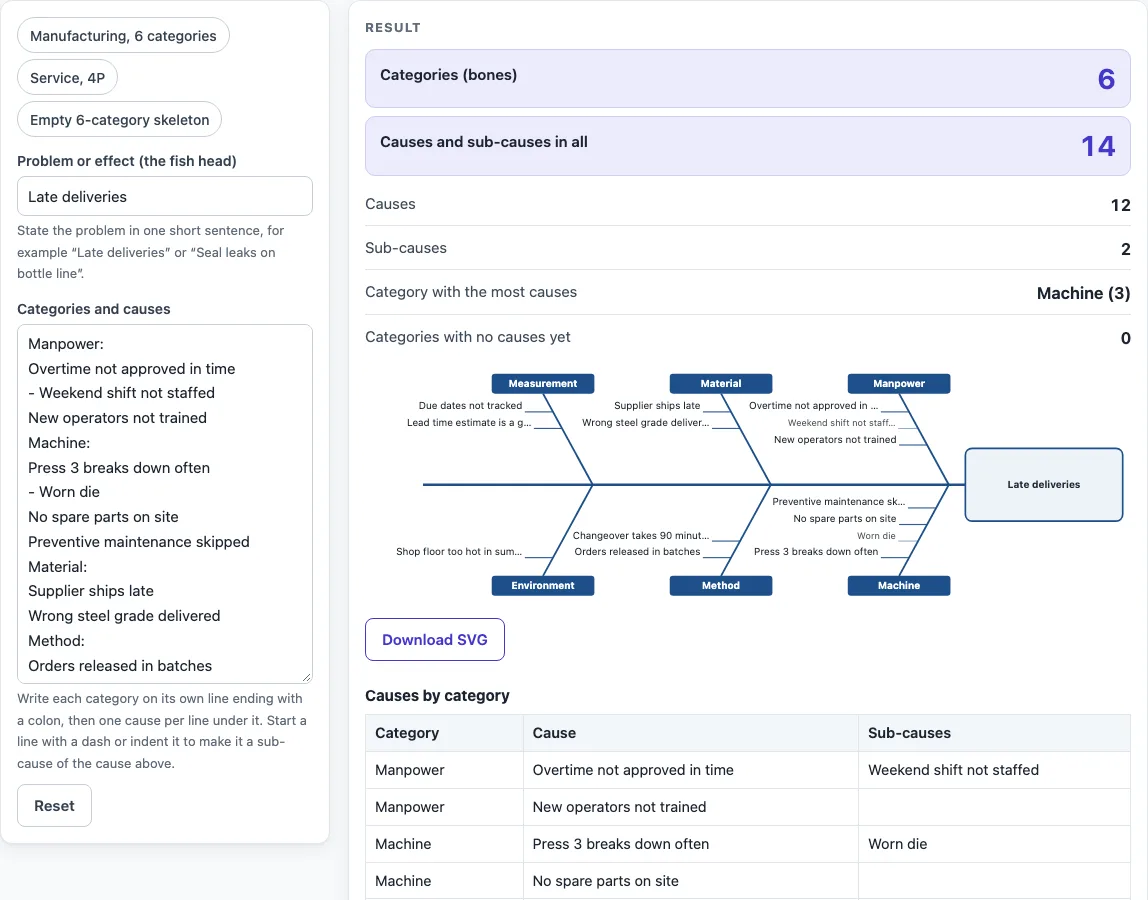
- Look at the diagram. The first category is drawn above the spine, the second below, and so on, up to 8 categories and 30 causes per category.
- Check the counts and any warning, such as a category with no causes.
- Click Download SVG to save the picture, or open “How it was calculated” for the table of causes by category.
“Copy link” keeps your diagram in the page address, and “Print / save as PDF” gives a dated record.
For example, the manufacturing preset has the effect “Late deliveries”, 6 categories, 12 causes and 2 sub-causes. The Machine bone, the busiest with 3 causes, holds “Press 3 breaks down often” with the sub-cause “Worn die”.
What is a fishbone diagram?
A fishbone diagram is a cause-and-effect diagram created by Kaoru Ishikawa. The problem is the head of the fish, and the causes that could contribute to it are grouped into categories that branch off a central spine like bones. It is used in product design and quality defect prevention to list the factors that could cause an effect. Each cause is a possible source of variation, and the diagram helps a team look in more than one place before it settles on an answer.
What are the categories of a fishbone diagram?
The categories depend on the field. In manufacturing the usual set comes from the Toyota Production System: the 5 Ms are Manpower, Machine, Material, Method and Measurement (with environment counted under measurement or medium). Some teams add three more to make the 8 Ms: Mission or mother nature, Management or money power, and Maintenance. A six-category version splits the environment out on its own, and that is the template in this tool. For services, the 4 or 5 Ss are Surroundings, Suppliers, Systems, Skill and Safety, and in product marketing the 8 Ps are Product, Price, Place, Promotion, People, Process, Physical evidence and Performance. You can type any category names you like.
How do I use a fishbone diagram to find a root cause?
Write the problem as a specific effect, brainstorm causes with the people who do the work, and place each one under a category. Then go back through the causes and ask “why?” again for the likely ones, adding the answers as sub-causes. A long list on one bone shows where the ideas are, but it does not prove the root cause. Pick the most likely causes and confirm them with data, for example with a Pareto chart of defect types, before you change anything.
Fishbone diagram example
A packaging line has a problem with “Seal leaks on bottle line”. Under Machine the team lists “Capper torque drifts” with the sub-cause “Clutch worn”. Under Material they list “Caps out of tolerance”, and under Method “Torque not checked each shift”. The diagram shows three bones with three causes and one sub-cause, and the team next measures the torque on a sample of caps to see which cause is real.
Worked examples
| Input | Result |
|---|---|
| effect “Late deliveries” | 6 categories, 12 causes, 2 sub-causes |
| effect “Customers wait too long on the phone” | 4 categories, 7 causes, 1 sub-causes |
| effect “Seal leaks on bottle line” | 3 categories, 3 causes, 1 sub-causes |
Calculated by the tool above with these values.
Frequently asked questions
Can I use the diagram in commercial projects or client reports?
Yes. You can use diagrams and results in commercial work, including reports, audits, client projects and training material. You do not need to credit the tool.
Is the fishbone diagram maker free, and is my text uploaded?
The tool is free and needs no account. The diagram is drawn in your browser, and nothing you type is uploaded.
How do I save the diagram?
Click “Download SVG” under the diagram to save it as a vector picture that opens in a browser, PowerPoint, Word or a graphics program without losing sharpness. “Print / save as PDF” saves a dated record of your text and counts, and “Copy link” copies the page address, which stores the diagram so it reopens later.
How many categories and causes can I add?
Up to 8 categories and 30 causes per category, each with any number of sub-causes. Long text is shortened inside the picture, and the table shows it in full.
What is the difference between a fishbone diagram and a Pareto chart?
A fishbone diagram lists possible causes and groups them, without any data. A Pareto chart counts how often each cause or defect type actually occurs and ranks them. Use the fishbone diagram to generate ideas and the Pareto chart to decide which ones matter most.
Why does the tool show a warning?
Warnings flag inputs that may give a weak diagram: a category with no causes, only one category, fewer than 3 causes, two categories with the same name, or lines longer than 120 characters.
Are the results exact?
The counts are calculated from the text you enter. The diagram is a tool for thinking, so check the causes against your own process data before acting on them.
Where do the category sets come from?
- Wikipedia, Ishikawa diagram (accessed 2026-10-17): the history, the 5 Ms and 8 Ms for manufacturing, the 8 Ps for product marketing and the 4 or 5 Ss for service industries.
Related tools
- Pareto Chart Maker: use it to rank defect types or causes by how often they occur.
- Control Chart Generator: use it to see whether a process is stable over time.
- FMEA Template and RPN Calculator: use it to score and rank the failure modes you found.
- Run Chart Maker: use it to check a series for shifts and trends.
- Histogram Maker: use it to see the spread of the measurements behind a cause.
- All manufacturing and inventory calculators: use it to browse every calculator on the site.