EOQ Formula and Calculator (Economic Order Quantity)
Enter annual demand, the cost per order and the holding cost to get the economic order quantity, the annual costs and the reorder point.
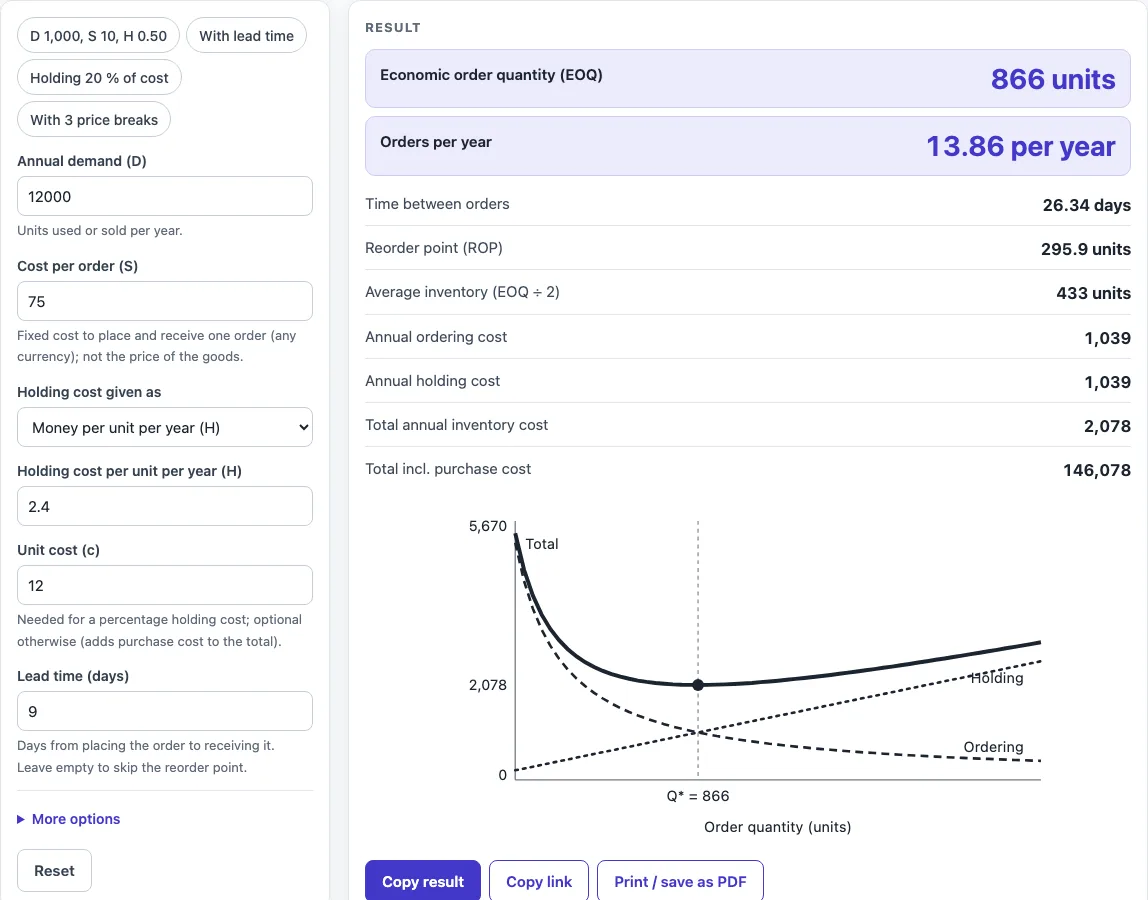
How to use the EOQ Calculator
- Enter the annual demand (D) in units per year. It must be a positive number.
- Enter the cost per order (S), the fixed cost each time you place an order. Use the same currency for every money value.
- Under Holding cost given as, either type money per unit per year, or choose a percentage of unit cost and then enter the unit cost, which is required in that case.
- Enter a lead time in days to get a reorder point. Optional safety stock is added to it. Leave the lead time empty to skip the reorder point.
- Open More options to change the days per year used for daily demand (365 by default) or to add up to 3 quantity price breaks, one per line as minimum quantity and unit price.
- Read the EOQ, orders per year, days between orders, annual costs and average inventory. Open “How it was calculated” to see the formula with the values substituted.
- Look at the chart. The EOQ is marked at the lowest point of the total cost curve.
Preset buttons above the form load typical cases, such as “D 1,000, S 10, H 0.50” or “With 3 price breaks”. Reset restores the starting example. Copy link stores every input in the page address, so the same calculation reopens later or can be sent to a colleague. Copy result copies the result lines with a link. Print / save as PDF produces a one-page record with the inputs, results, calculation steps and date.
What is the EOQ formula?
The EOQ formula gives the order size that makes total annual inventory cost as low as possible. Written as EOQ = √(2·D·S ÷ H), it is also called the EOQ equation, and it is usually credited to Harris (1913) and Wilson (1934).
The terms are D, the annual demand in units; S, the cost per order; and H, the holding cost per unit per year. For an order size Q, the ordering cost per year is S·D ÷ Q, because there are D ÷ Q orders. The holding cost per year is H·Q ÷ 2, because the average stock held is Q ÷ 2. The total annual cost is therefore S·D ÷ Q + H·Q ÷ 2. Finding the Q that makes this total smallest gives Q = √(2·D·S ÷ H).
At the EOQ, the annual ordering cost equals the annual holding cost. This is a useful check on any result. Take D 1,000, S 10 and H 0.50. The EOQ is √(2 × 1,000 × 10 ÷ 0.50) = √40,000 = 200 units. That gives 1,000 ÷ 200 = 5 orders per year, an ordering cost of 5 × 10 = 50, and a holding cost of 0.50 × 200 ÷ 2 = 50. The two are equal, and the total is 100.
What is the economic order quantity formula?
The economic order quantity formula is the same expression, EOQ = √(2·D·S ÷ H). The inputs must use consistent units: D per year, S per order, and H per unit per year. If you know the holding cost as a percentage of unit cost, first calculate H = percentage × unit cost.
For example, D 5,000, S 49, and a holding rate of 20% on a unit cost of 5.00 give H = 0.20 × 5.00 = 1.00. The EOQ is √(2 × 5,000 × 49 ÷ 1.00) = √490,000 = 700 units.
The basic formula assumes a single unit price. When suppliers offer quantity discounts, the calculator checks each price tier. For each tier it computes the EOQ at that price, raises it to the break quantity if it is lower, and drops it if it is above the next break. It then picks the order quantity with the lowest total cost, D·p + S·D ÷ Q + H·Q ÷ 2, where p is the unit price for that tier.
Worked examples
| Input | Result |
|---|---|
| D 12,000 per year, S 75 per order, H 2.4 | EOQ 866 units, 13.9 orders per year, total cost 2,078 |
| D 1,000 per year, S 10 per order, H 0.5 | EOQ 200 units, 5 orders per year, total cost 100 |
| D 5,000 per year, S 49 per order, H 1 | EOQ 700 units, 7.14 orders per year, total cost 700 |
| D 5,000 per year, S 49 per order, H 1 | EOQ 700 units, 7.14 orders per year, total cost 700; with price breaks order 1,000 units at 4.8 |
Calculated by the tool above with these values.
Frequently asked questions
Can I use the results in commercial projects or client reports?
Yes. You may use the results in commercial work, including reports, audits, client projects and training material, without attribution. Check the figures against your own process data before acting on them.
Is the calculator free, and is anything I type uploaded?
The calculator is free, and there is no account or sign-up. Everything is calculated in your browser, and nothing you type is uploaded.
Can I print or share a calculation?
Yes. Print / save as PDF creates a one-page record with the inputs, results, calculation steps and date. Copy link stores all inputs in the page address, so anyone who opens the link sees the same calculation.
What does the lead time warning mean?
A warning appears when the lead time is longer than the time between orders. This means more than one order is on the way at the same time. Check your ordering plan in that case, because the reorder point then covers more than one open order.
Why should I check the results against my own data?
The results are calculated only from the values you enter. Real demand often varies, and costs such as ordering and storage may not be captured exactly by the inputs. Confirm the figures with your own process data before making decisions.
Do I need to use the same currency for every cost?
Yes. Money is entered as plain numbers without a currency symbol, so use the same currency for the order cost, the holding cost and the unit cost. Mixing currencies gives results that are not meaningful.
Where do the formulas come from?
- Harris (1913), “How Many Parts to Make at Once”, Factory 10(2); Wilson (1934), Harvard Business Review 13(1): the EOQ formula.
- Heizer & Render, Operations Management, and Silver, Pyke & Peterson: the all-units quantity-discount method.
Related tools
- Inventory Turnover Calculator (Stock Turnover Ratio) — use it to see how often your stock is sold and replaced over a period.
- Cpk Formula and Calculator — use it to measure how well a process stays within its specification limits.
- Cycle Time Calculator — use it to work out the time one unit takes to pass through a process.
- First Pass Yield Calculator — use it to find the share of units that pass a process without rework.
- Gage R&R Formula and Calculator — use it to check whether a measurement system is precise enough for your process.
- Kanban Formula and Calculator — use it to size kanban cards or containers from demand and lead time.
- MTBF Calculator (Mean Time Between Failures) — use it to estimate the average operating time between failures of equipment.
- All manufacturing and inventory calculators — use it to browse every calculator on the site.