CUSUM Chart Maker
Paste measurements in time order to draw a tabular CUSUM chart, see the point where the mean shifted and get an estimate of the new mean.
The CUSUM Chart Maker is a free tool that turns a list of measurements into a tabular CUSUM (cumulative sum) control chart. You paste the values in time order, give the target mean and the standard deviation (or let the tool estimate them from a baseline), and it calculates the upper and lower cumulative sums, draws them against the decision interval and tells you the first point where the process mean has shifted. It also estimates the new mean after the shift. A CUSUM chart picks up a small, steady shift of about 1 standard deviation or less faster than an ordinary Shewhart chart does.
The tool runs in your browser, so you can start right away. There is no account or sign-up, and nothing you paste is uploaded. The chart and the full table update as you type.
How to make a CUSUM chart
- Paste your measurements into Data, in time order, one per line. If you measure in subgroups, enter the subgroup means.
- To try an example first, click one of the preset buttons above the form, such as “NIST example, 20 means” or “Downward shift, 16 points”.
- Enter the target mean (μ₀), the mean of the process when it is in control. Leave it blank to use the mean of the baseline points.
- Enter the standard deviation (σ) of the points you entered. Leave it blank to estimate it as the average moving range divided by 1.128 from the baseline points.
- Open More options to change k (the reference value, 0.5 by default), h (the decision interval, 5 by default) or the number of baseline points.
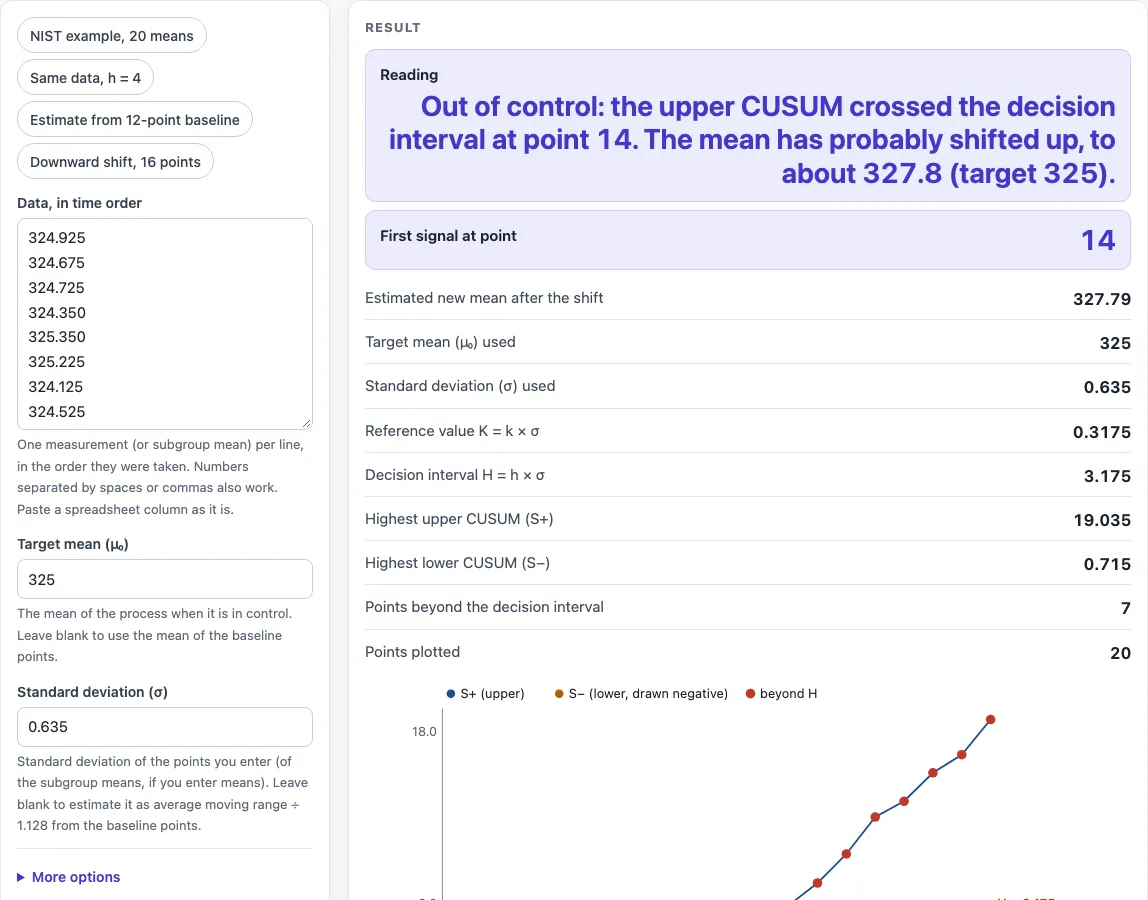
- Read the result: the reading, the first signal point and the estimated new mean.
- Look at the chart. The blue line is the upper sum S+, the orange line is the lower sum S− drawn below zero, and the dashed red lines are the decision interval ±H.
- Open “How it was calculated” for the formulas and the CUSUM table, one row per point.
“Copy link” keeps your data in the page address, and “Print / save as PDF” gives a dated record with the chart.
For example, the NIST example has 20 sample means and a target of 325. The upper sum stays at zero until point 13 and goes above H = 3.175 at point 14, so the chart signals an upward shift there.
What is a CUSUM chart?
A CUSUM chart adds up the small differences between each measurement and the target. While the process stays on target, the positive and negative differences cancel and the sum wanders around zero. When the mean shifts, even slightly, the differences all have the same sign, so the sum climbs steadily and crosses a limit. NIST notes that CUSUM charts detect shifts of 2 sigma or less more efficiently than Shewhart charts, which only react when a single point lands beyond a control limit.
How is a CUSUM calculated?
The tabular CUSUM keeps two sums. The upper sum is S+(i) = max(0, S+(i−1) + xᵢ − μ₀ − K) and the lower sum is S−(i) = max(0, S−(i−1) + μ₀ − K − xᵢ), both starting at 0. K is the reference value (slack) and it is set to k × σ. The process is out of control when S+ or S− goes above the decision interval H = h × σ. In the NIST example (μ₀ = 325, K = 0.3175), point 13 is 328.325, so S+ = 328.325 − 325 − 0.3175 = 3.0075 and point 14 adds 1.9325 to reach 4.94.
How do I choose k and h for a CUSUM chart?
The usual rule of thumb is to set k to half the shift you want to detect, in standard deviations, and h to about 4 or 5. With k = 0.5 and h = 5 the chart is tuned to a 1σ shift. A smaller k reacts to smaller shifts, and a larger h gives fewer false alarms but a later signal. The NIST design that uses a false-alarm probability of 0.0027 and a 1σ shift gives k = 0.5σ and h = 6.6σ for the same data.
How do I read a CUSUM chart?
Find the first point where the upper or lower sum goes above the dashed line. The side tells you the direction: S+ means the mean went up, S− means it went down. Then look back along the line to where it last left zero. That is roughly where the shift began, and the number of points since then is N+ or N−. The new mean is estimated as μ₀ + K + S+ ÷ N+ for an upward shift and μ₀ − K − S− ÷ N− for a downward one. In the NIST example the estimate at point 14 is 325 + 0.3175 + 4.94 ÷ 2 = 327.79.
CUSUM vs Shewhart control chart: when should I use a CUSUM?
Use a Shewhart chart such as an X̄-R or individuals chart for large shifts and sudden problems, and use a CUSUM for small drifts in the mean, for example tool wear, a slowly changing fill weight or a laboratory calibration drift. They work well together. The Control Chart Generator draws the Shewhart charts, and the Run Chart Maker gives a quick check on a short series.
Worked examples
| Input | Result |
|---|---|
| 20 points, μ₀ = 325, σ = 0.635, k = 0.5, h = 5 | first signal at point 14, new mean about 327.8 |
| 20 points, μ₀ = 325, σ = 0.635, k = 0.5, h = 4 | first signal at point 13, new mean about 328.3 |
| 20 points, μ₀ = 324.8, σ = 0.4171, k = 0.5, h = 5 | first signal at point 13, new mean about 326.7 |
| 16 points, μ₀ = 10, σ = 0.2, k = 0.5, h = 5 | first signal at point 14, new mean about 9.55 |
Calculated by the tool above with these values.
Frequently asked questions
Can I use the results in commercial projects or client reports?
Yes. You can use results in commercial work, including reports, audits, client projects and training material. You do not need to credit the tool.
Is the CUSUM chart maker free, and is my data uploaded?
The tool is free and needs no account. All calculations run in your browser, and nothing you paste is uploaded.
Can I print or share a CUSUM chart?
Yes. “Print / save as PDF” creates a one-page record with your inputs, the results, the calculation steps and the date. “Copy link” copies the page address, which stores your data, so the same chart reopens later or can be sent to a colleague.
What do I enter if I measure in subgroups?
Enter the mean of each subgroup as one point and enter the standard deviation of the subgroup means (σ divided by √n if you know the process σ). The tabular CUSUM is then applied to the means, as in the NIST example.
How is σ estimated when I leave it blank?
The tool uses the average moving range of the baseline points divided by 1.128, the d2 constant for pairs of points (NIST section 6.3.2.2). Use the baseline option so that points after a shift do not inflate σ, or enter a σ you trust.
Why does the tool show a warning?
Warnings flag inputs that may give a poor answer: fewer than 20 baseline points for the estimates, an h below 3 (many false alarms), a k above 1.5, a signal inside the baseline, or σ estimated from data that includes a shift.
Are the results exact?
The results are calculated from the values you enter. Check them against your own process data before acting on them.
Where do the formulas come from?
- NIST/SEMATECH e-Handbook of Statistical Methods, section 6.3.2.3 “CUSUM Control Charts”: the tabular CUSUM, the k and h rule of thumb and the worked 20-point example (public domain).
- NIST/SEMATECH e-Handbook, section 6.3.2.2: the moving-range estimate of σ with d2 = 1.128.
- Montgomery, Introduction to Statistical Quality Control: k and h in σ units and the estimate of the new mean after a signal.
Related tools
- Control Chart Generator: use it to draw I-MR, X̄-R, X̄-s, p, np, c and u charts with the Western Electric rules.
- Run Chart Maker: use it to find shifts and trends in a series with a median line.
- Histogram Maker: use it to see the shape and spread of the same measurements.
- Cpk Formula and Calculator: use it to check whether the process meets its specification limits.
- Pareto Chart Maker: use it to rank the causes of defects.
- All manufacturing and inventory calculators: use it to browse every calculator on the site.