Cpk Formula and Calculator
Enter the mean, standard deviation and specification limits, or paste your measurements, to get Cp, Cpk, Pp, Ppk and the expected parts out of spec.
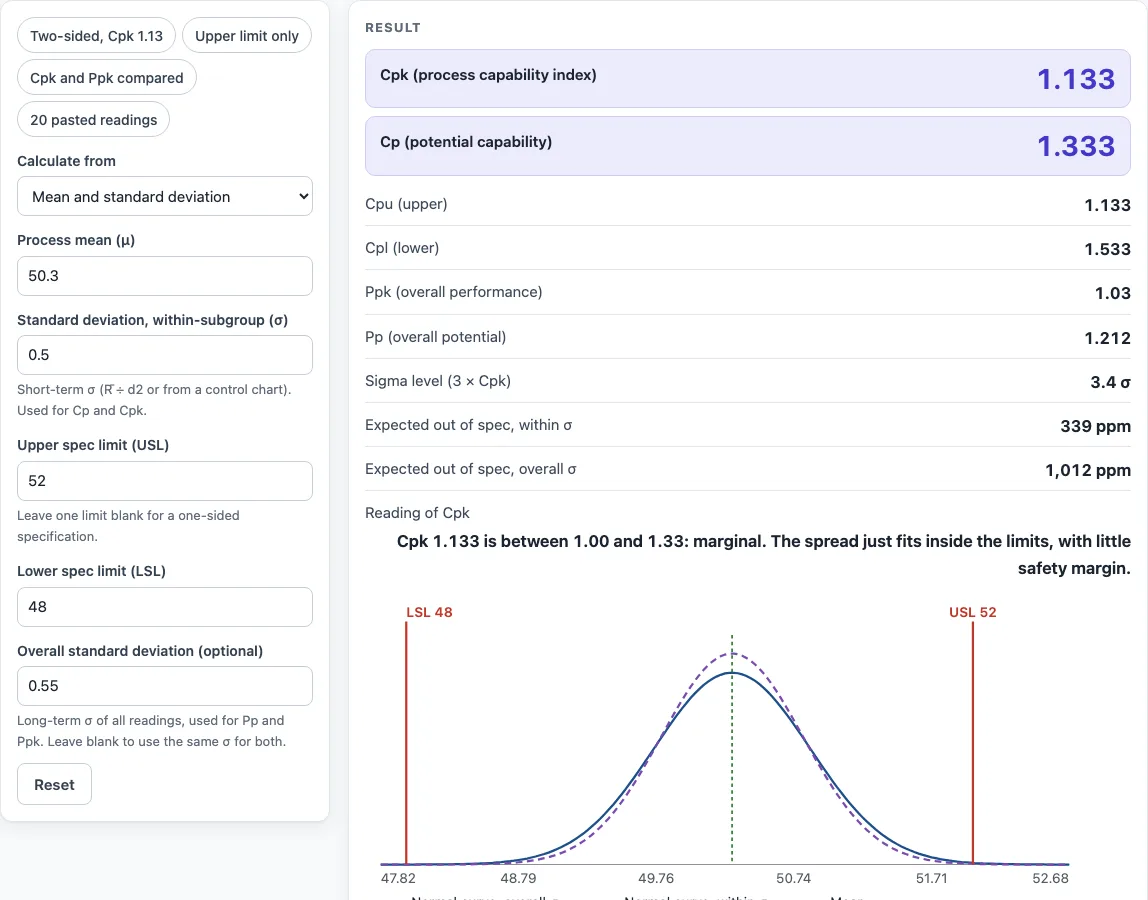
This free Cpk calculator works out the process capability index, Cpk, from your process mean, standard deviation and specification limits. The Cpk formula is Cpk = min(Cpu, Cpl), where Cpu = (USL − μ) ÷ 3σ and Cpl = (μ − LSL) ÷ 3σ, so Cpk is the smaller of the two distances from the mean to a limit, each measured in three standard deviations.
You can type the values directly or paste raw readings. The tool also reports Cp, Pp, Ppk, a sigma level, expected parts out of spec and a Cpk graph showing the data, the normal curve and the limits. It runs in your browser, is free, and needs no account or sign-up.
How to use the Cpk Calculator
- Under Calculate from, pick Mean and standard deviation if you already know μ and σ, or Pasted measurements if you have raw readings. The preset buttons above the form load typical cases.
- In summary mode, type the process mean μ, the within-subgroup σ, the upper spec limit USL and the lower spec limit LSL. For a one-sided specification, leave one limit blank. At least one limit is required, and LSL must be below USL.
- In pasted mode, paste your readings. Commas, spaces or new lines all work. If the readings come in groups, enter the subgroup size. Leave it blank to use the sample standard deviation of all readings.
- Open More options to reach the less common inputs, such as the optional overall σ.
- Read the result. It updates as you type. Check the Cpk value, the plain-language reading, the sigma level and the expected ppm out of spec.
- Open How it was calculated under the result to see the formula, the values substituted and the answer with units.
- Look at the Cpk graph. In pasted mode it includes a histogram. The red lines mark LSL and USL, and the dotted line marks the mean.
Reset restores the starting example. Copy result copies the result lines with a link. Copy link copies the page address, which stores every input, so the same calculation reopens later or can be sent to a colleague. Print / save as PDF produces a one-page record with the inputs, results, calculation steps and date.
What is the ppk formula?
Ppk uses the same formula as Cpk, but with the overall standard deviation in place of the within-subgroup σ. It is Ppk = min(Ppu, Ppl), where Ppu = (USL − μ) ÷ 3σoverall and Ppl = (μ − LSL) ÷ 3σoverall.
The overall σ is the sample standard deviation (n − 1) of all readings, so it includes shifts between subgroups. If it is larger than the within σ, Ppk falls below Cpk, which suggests the process drifts over time. If you leave the overall σ blank in summary mode, the same σ is used, so Pp and Ppk equal Cp and Cpk, and a calculation step says so.
How do you calculate process capability?
Process capability compares the spread of the process with the width of the specification. Cp = (USL − LSL) ÷ 6σ measures spread only, and Cpk = min(Cpu, Cpl) also accounts for how well the process is centred.
The within σ depends on how you group the data. With no subgroup size, it is the sample standard deviation. With subgroup size 1, it is the average moving range ÷ 1.128. With subgroup sizes 2 to 10, it is R̄ ÷ d2, using the constants 1.128, 1.693, 2.059, 2.326, 2.534, 2.704, 2.847, 2.970 and 3.078. At least two complete subgroups are needed. Leftover readings are left out of R̄, with a warning, but still count in the mean and overall σ.
The sigma level is 3 × Cpk, so a Cpk of 2.0 gives a sigma level of 6. When Cp is more than 0.1 above Cpk, the process is off-centre. Moving the mean toward the middle of the specification would raise Cpk toward Cp.
For example, with μ = 50.3, σ = 0.5, LSL 48 and USL 52: Cpu = (52 − 50.3) ÷ 1.5 = 1.133, Cpl = (50.3 − 48) ÷ 1.5 = 1.533, so Cpk = 1.133. Cp = 4 ÷ 3 = 1.333, which is higher because the mean sits closer to USL. Centring the mean at 50 would raise Cpk to equal Cp.
Worked examples
| Input | Result |
|---|---|
| μ = 50.3, σ = 0.5, LSL 48, USL 52 | Cpk = 1.133, Cp = 1.333 |
| μ = 10.02, σ = 0.05, LSL 9.85, USL 10.15 | Cpk = 0.8667, Cp = 1 |
| μ = 100, σ = 1.2, USL 105 | Cpk = 1.389 |
| 20 readings, LSL 9.92, USL 10.08 | Cpk = 1.308, Cp = 1.551 |
| μ = 25, σ = 0.8, LSL 22 | Cpk = 1.25 |
Calculated by the tool above with these values.
Frequently asked questions
Can I use the results in commercial projects or client reports?
Yes. Results may be used in commercial work, including reports, audits, client projects and training material, without attribution. Results are calculated from the values you enter, so check them against your own process data before acting on them.
Is the calculator free, and is anything I type uploaded?
Yes, the calculator is free, and there is no account or sign-up. Everything is calculated in your browser, and nothing you type is uploaded.
Can I print or share a calculation?
Yes. Print / save as PDF produces a one-page record with the inputs, results, calculation steps and date. Copy link stores every input in the page address, so a colleague can open the same calculation.
What does a Cpk of 1.33 mean?
The tool reads Cpk below 1.00 as not capable, 1.00 to 1.33 as marginal, 1.33 to 1.67 as capable, and 1.67 or higher as capable with a wide margin. A value of 1.33 is the minimum many customers ask for.
Can I calculate Cpk with only one spec limit?
Yes. Leave either USL or LSL blank for a one-sided specification. Cpk then equals the one-sided index, and Cp is not defined. For μ = 100, σ = 1.2 and USL 105, Cpk = Cpu = 1.389.
Where do the formulas come from?
- AIAG, Statistical Process Control (SPC) Reference Manual, 2nd ed.: Cp, Cpk, Pp, Ppk and the d2 constants (1.128, 1.693, 2.059, 2.326, 2.534, 2.704, 2.847, 2.970, 3.078 for subgroups of 2 to 10).
- NIST/SEMATECH e-Handbook, Process capability, and Montgomery, Introduction to Statistical Quality Control.
- The 1.33 and 1.67 levels are the commonly published AIAG PPAP initial-study criteria; your customer’s requirement may differ.
Related tools
- Inventory Turnover Calculator for measuring how often stock sells and is replaced.
- Cycle Time Calculator for finding how long a product takes to move through a process.
- EOQ Formula and Calculator for finding the order quantity that balances ordering and holding costs.
- First Pass Yield Calculator for checking the share of units that pass without rework.
- Gage R&R Formula and Calculator for checking whether measurement error is hiding real process variation before you trust a capability result.
- Kanban Formula and Calculator for sizing pull-system kanban quantities.
- MTBF Calculator for estimating mean time between failures.
- All manufacturing and inventory calculators for the full list of tools on this site.