Control Chart Generator (SPC)
Paste your measurements or defect counts to draw a control chart with centre line, upper and lower control limits and out-of-control signals.
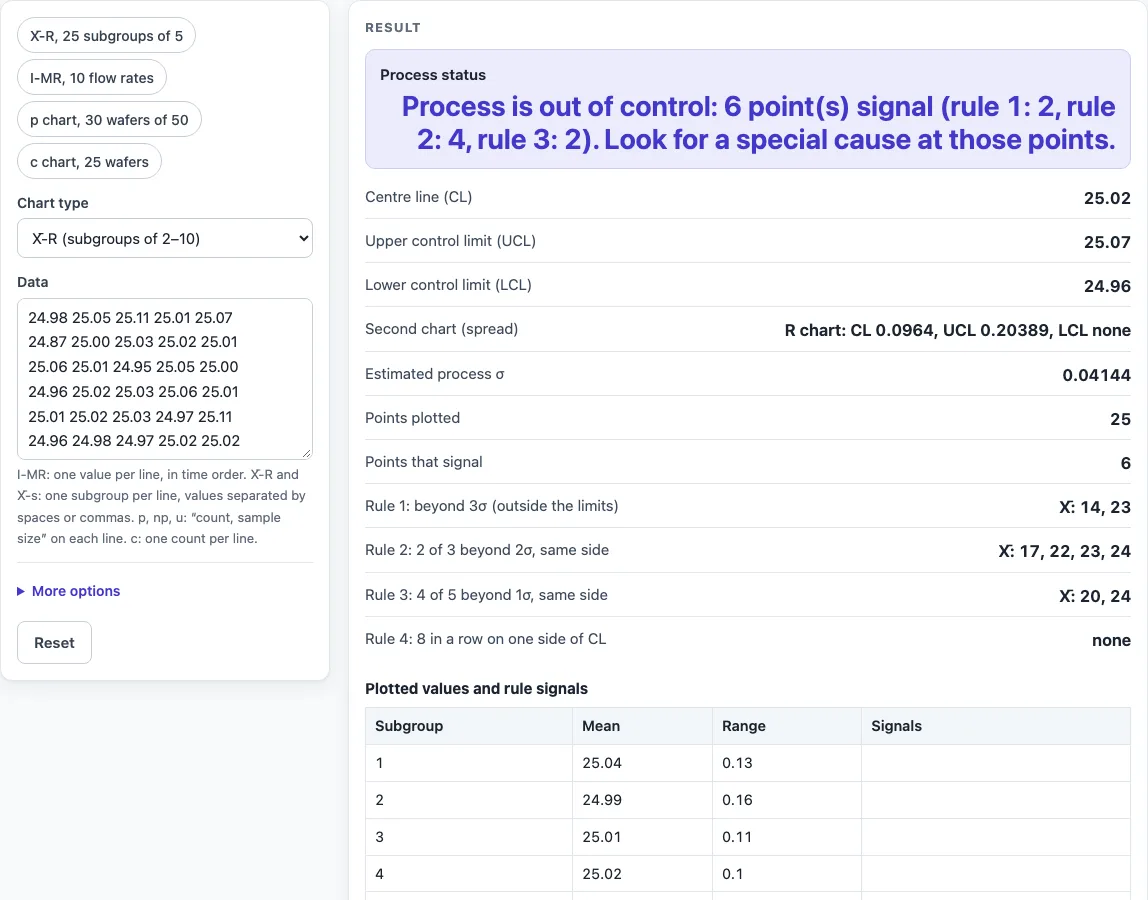
How to use the Control Chart Generator
- Pick the chart that matches your data. Use I-MR for single measurements, X̄-R or X̄-s for subgroups, p, np or u for defectives with sample sizes, and c for defect counts per unit.
- Paste your data in the format for that chart:
- I-MR: one value per line, in time order.
- X̄-R and X̄-s: one subgroup per line, with values separated by spaces or commas. X̄-R accepts subgroup sizes from 2 to 10, and X̄-s accepts 2 to 25.
- p, np and u: one “count, sample size” pair per line.
- c: one defect count per line.
- Look at the main chart. The result updates as you type, and it shows the centre line, UCL and LCL.
- Read the signal table. It lists the point numbers that break each rule.
- Choose your rules under More options: “Rules 1–4 (Western Electric)” or “Rule 1 only (beyond 3σ)”. The spread chart (R, MR or s) is always checked for points beyond its own limits.
- Note the estimated process σ in the results.
- Open “How it was calculated” under the result to see the formula, the values substituted and the answer with units.
Use a preset button above the form to load a typical case, or press Reset to return to the starting example. Buttons below the result let you copy, share or print the calculation, as explained in the FAQ.
What are statistical process control rules?
Statistical process control rules are tests that flag points or patterns on a control chart that are unlikely to occur from ordinary random variation alone. This tool checks four Western Electric rules on the main chart:
- Any point beyond 3σ from the centre line.
- 2 of 3 points beyond 2σ on the same side.
- 4 of 5 points beyond 1σ on the same side.
- 8 points in a row on one side of the centre line.
A signal is a prompt to investigate, not proof of a fault. Rule 1 alone gives a false alarm about once in 371 points on average. Adding the other rules raises that to about once in 92 points (NIST). The “Rule 1 only” choice therefore gives fewer false alarms but catches fewer shifts.
How are the control limits calculated?
Control limits sit three estimated standard deviations either side of the centre line. They come from the data you paste, not from customer targets. This first stage of a study, often called Phase I, uses past data to set the limits and check whether the process was stable.
For individual values, the limits are x̄ ± 3·MR̄/1.128, where MR̄ is the average absolute difference between neighbouring values and 1.128 is d2 for n = 2. In the NIST flow-rate example (49.6, 47.6, 49.9 and so on), x̄ = 50.81, MR̄ = 1.8778, UCL = 55.8041 and LCL = 45.8159, and no points signal. For defect counts, c̄ = 16 gives limits of c̄ ± 3√c̄, so UCL = 28 and LCL = 4. In that NIST wafer example, wafer 24 with 31 defects is above the upper limit.
Control limits describe what the process does. Specification limits describe what the customer wants. A process can be in control and still fail its specification, so do not read control limits as targets. A pre control chart is a different method that uses specification limits to set its zones, so this tool does not draw one.
Sources
- NIST/SEMATECH e-Handbook of Statistical Methods: Shewhart control charts and constants (A2, D3, D4, d2; c4 formula; the 25-sample guideline and false-alarm rates), individuals charts, p and c charts and the worked examples used in the tests
- Constants cross-checked against the ASTM/AIAG table for n = 2–25 (MIT 2.810 reading)
Worked examples
| Input | Result |
|---|---|
| X̄-R (subgroups of 2–10), 25 points | 6 point(s) signal |
| I-MR (individual values), 10 points | no signals |
| p chart (fraction defective), 30 points | 4 point(s) signal |
| c chart (defects per unit), 25 points | 1 point(s) signal |
| u chart (defects per unit, varying size), 10 points | no signals |
Calculated by the tool above with these values.
Frequently asked questions
Can I use the results in commercial projects or client reports?
Yes. Results may be used in commercial work, including reports, audits, client projects and training material, without attribution. Check the numbers against your own process data before you act on them.
Is the calculator free, and is anything I type uploaded?
Yes, the calculator is free, and there is no account or sign-up. Everything is calculated in your browser, and nothing you type is uploaded.
Can I print or share a calculation?
Yes. Print / save as PDF produces a one-page record with the inputs, results, calculation steps and date. Copy link stores every input in the page address, so the same calculation reopens later or can be sent to a colleague.
Why does the tool warn me when I have fewer than 25 points?
Shewhart suggested 25 points as the number needed to set limits, so the tool warns you below that count. Limits based on fewer points are less dependable, so treat them as provisional until you have more data.
Does a signal mean my process is out of control?
A signal means a point or pattern is unlikely under ordinary variation, so it is worth investigating. It does not identify the cause. Results are calculated from the values you enter; check them against your own process data before acting on them.
Related tools
- Cpk calculator: compare process capability with specification limits once your process is stable.
- Histogram maker: see the shape and spread of your data alongside a control chart.
- Pareto chart maker: rank defect categories to decide which signal to investigate first.
- CUSUM chart maker: catch a small, steady shift in the mean that a Shewhart chart is slow to show.
- Run chart maker: plot the data against its median first, with shift and trend rules, before you set control limits.
- Gage R&R calculator: test whether measurement error is hiding real process variation.
- All manufacturing and inventory calculators: browse the full set of tools on this site.