Inventory Turnover Calculator (Stock Turnover Ratio)
Enter cost of goods sold and your inventory values to get the inventory turnover ratio, the days of inventory on hand and the weeks of supply.
Popular tools
- Control Chart Generator (SPC)Paste your measurements or defect counts to draw a control chart with centre line, upper and lower control limits and out-of-control signals.
- Histogram MakerPaste your numbers to make a histogram with a frequency table, summary statistics, optional spec limits and a normal curve.
- Cpk Formula and CalculatorEnter the mean, standard deviation and specification limits, or paste your measurements, to get Cp, Cpk, Pp, Ppk and the expected parts out of spec.
How to use the Inventory Turnover Calculator
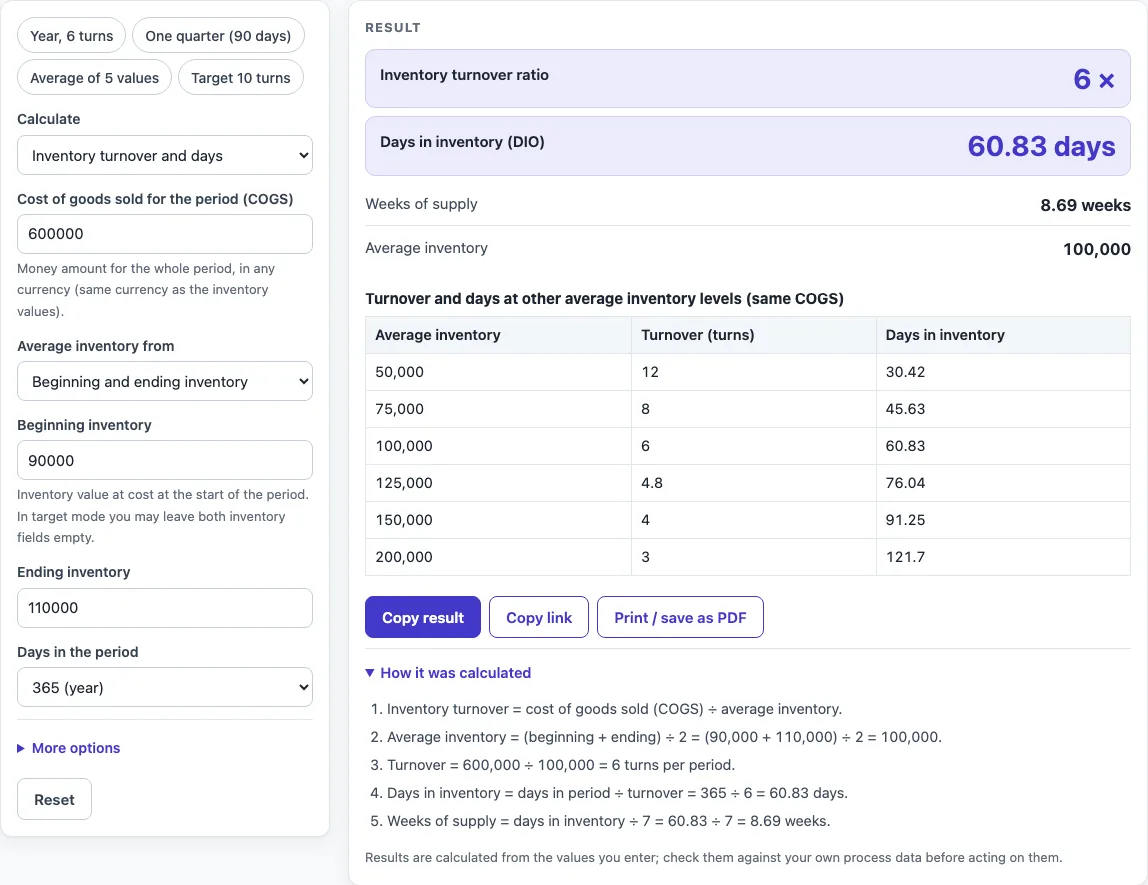
- Under Calculate, choose Inventory turnover and days to measure your current turnover, or Target turns → maximum average inventory to work out a limit.
- Enter your COGS as a positive number. Use the same currency and period as your inventory figures.
- Enter average inventory in one of three ways: beginning and ending inventory, a list of period-end values (one per line, at least two), or an average you already have.
- Select the period: 365, 360, 90 or 30 days.
- Read the result. It updates as you type.
- Open How it was calculated under the result to see the formula, the values substituted and the answer with units.
- In target mode, enter the target turns. The inventory fields are optional. If you fill them in, the calculator also shows your current turnover and how much inventory must be cut.
Preset buttons above the form load typical cases, such as “Year, 6 turns” or “Average of 5 values”. Open More options for less common inputs, including the sales-based option, and use Reset to return to the starting example. Copy result copies the result lines with a link. Copy link copies the page address, which stores all your inputs so you can reopen the calculation later or send it to a colleague. Print / save as PDF creates a one-page record with the inputs, results, steps and date.
Inventory turns and inventory turnover ratio: meaning and definition
Inventory turns, also called inventory turnover, show how many times a business sells through its average stock in one period. Each turn means the stock was used up and replaced once. A higher number means stock moves faster. A lower number means stock sits longer on the shelf or in the warehouse.
What is the inventory turnover formula (inventory turnover explained)?
The equation for inventory turnover is COGS divided by average inventory. This is the standard accounting definition. Average inventory is the mean of the beginning and ending values:
Average inventory = (beginning inventory + ending inventory) ÷ 2
Turnover = COGS ÷ average inventory
For example, COGS of 600,000 and average inventory of 100,000 give 600,000 ÷ 100,000 = 6 turns.
How do you calculate stock turnover?
Divide COGS for the period by the average stock held during that period. If you have several period-end values, add them up and divide by how many there are. The calculator does this for you when you enter a list.
The calculator also offers a sales-based option, which uses sales in place of COGS. That result is always higher than the COGS-based ratio, so it cannot be compared with benchmarks built on COGS. Use it only when you need a sales-based figure and label it clearly.
How do you calculate inventory days?
Calculating inventory days uses the turnover you just found. Days in inventory (DIO, or days inventory outstanding) equals the days in the period divided by turnover:
Days in inventory = period days ÷ turnover
With 365 days and 6 turns, the result is 365 ÷ 6 = 60.83 days. Weeks of supply equals days in inventory divided by 7, so 60.83 ÷ 7 = 8.69 weeks.
For a 90-day or 30-day period, the calculator also shows an annualised turnover:
Annualised turnover = turnover × 365 ÷ days in the period
For example, COGS of 150,000 and average inventory of 37,500 over 90 days give 4 turns and 22.5 days in inventory. The annualised turnover is 4 × 365 ÷ 90 = 16.2 turns.
How do you find the maximum inventory for a target?
In target mode, the calculator divides COGS by your target number of turns. The result is the largest average inventory that still reaches the target. With COGS of 1,200,000 and a target of 10 turns, the maximum is 1,200,000 ÷ 10 = 120,000, which equals 36.5 days in inventory over a 365-day period.
If you also enter beginning and ending inventory of 180,000 and 220,000, the average is 200,000. The current turnover is 1,200,000 ÷ 200,000 = 6, and 80,000 of inventory must be cut to reach 10 turns.
How do inventory levels change the result?
The table shows turnover and days in inventory when average inventory is 50%, 75%, 100%, 125%, 150% and 200% of your base value, with COGS held the same. This helps you see how much a change in stock affects the ratio.
Averages can hide seasonal swings. The calculator warns when the inventory values differ by more than a factor of two. Check your own process data before acting on any result.
Worked examples
| Input | Result |
|---|---|
| COGS 600,000, average inventory 100,000, 365-day period | 6 turns, 60.8 days in inventory |
| COGS 2,400,000, average inventory 300,000, 365-day period | 8 turns, 45.6 days in inventory |
| COGS 150,000, average inventory 37,500, 90-day period | 4 turns, 22.5 days in inventory |
| COGS 780,000, average inventory 113,000, 365-day period | 6.9 turns, 52.9 days in inventory |
| COGS 1,200,000, target 10 turns | average inventory at most 120,000 (36.5 days in inventory) |
Calculated by the tool above with these values.
Frequently asked questions
Can I use the results in commercial projects or client reports?
Yes. You may use results in commercial work, including reports, audits, client projects and training material, without attribution.
Is the calculator free, and is anything I type uploaded?
The calculator is free. Everything is calculated in your browser, and nothing you type is uploaded. There is no account or sign-up.
Can I print or share a calculation?
Yes. Print / save as PDF creates a one-page record with the inputs, results, calculation steps and date. Copy link copies a page address that stores your inputs, so the same calculation reopens later or can be sent to a colleague.
What does the warning for turnover below 1 or above 50 mean?
A turnover below 1 means average stock is larger than the COGS for the period, so stock is moving very slowly. A turnover above 50 is unusual and often means a wrong input, such as a mixed period or currency. Check both values before you use the result.
Why is my turnover higher when I select the sales basis?
The sales basis uses sales in place of COGS. Sales are normally higher than COGS, so the ratio is higher too. Do not compare it with COGS-based benchmarks.
Can I calculate turnover for a quarter?
Yes. Select the 90-day period, or load the “One quarter (90 days)” preset. The calculator then also shows an annualised turnover so you can compare it with a yearly figure.
What error appears if the result cannot be calculated?
The calculator shows an error if COGS is not a positive number, if a list has fewer than two values or contains an invalid value, or if average inventory is zero. Correct the input and the result will update.
Where do the formulas come from?
- Garrison, Noreen & Brewer, Managerial Accounting, and Weygandt, Kimmel & Kieso, Financial Accounting: inventory turnover = COGS ÷ average inventory; days in inventory = days in period ÷ turnover.
- Investopedia, Inventory Turnover Ratio: the same definitions.
Related tools
- EOQ Formula and Calculator (Economic Order Quantity): Use it to work out how much stock to order at a time, which affects your average inventory and turnover.
- Kanban Formula and Calculator: Use it to size kanban cards and set replenishment levels for steady stock flow.
- Cycle Time Calculator: Use it to measure how long items take to move through a process.
- First Pass Yield Calculator: Use it to measure the share of output that passes inspection the first time.
- Cpk Formula and Calculator: Use it to check whether a process stays within its specification limits.
- Gage R&R Formula and Calculator: Use it to check whether a measurement system is reliable enough for decisions.
- MTBF Calculator (Mean Time Between Failures): Use it to estimate the average time between failures of equipment.
- All manufacturing and inventory calculators: Use it to browse every calculator on this site.